Why your data cleaning is so painful (and how to fix it at the source)
Upstream data design mistakes that create downstream data cleaning chaos.
Katie Stone
February 17, 2026
5 min. read

Here's an uncomfortable truth about data cleaning: most of the pain analysts experience cleaning messy data could have been prevented by better decisions made upstream.
The numbers tell a clear story. If data architects spend an extra hour implementing proper field separation and validation during collection, they might save 100 analysts from spending 30 minutes each on cleanup. That's one hour invested versus 50 hours wasted. Yet in many organizations, the responsibility for data cleanup still falls on end users – the people furthest from the source and least equipped to fix systemic issues.
This isn't about blame. It's about recognizing where intervention creates maximum impact. The further data travels from its source, the harder it becomes to cleanse and the more people suffer the consequences. Let's examine the specific architectural choices that create downstream chaos, and more importantly, what both upstream and downstream teams can do about it.
When convenience upstream creates chaos downstream
Three architectural patterns consistently create the most downstream pain: field concatenation, fixed-width formatting, and unrestricted input. Each issue represents a choice that makes initial data storage simpler but analysis exponentially harder.
The concatenation trap
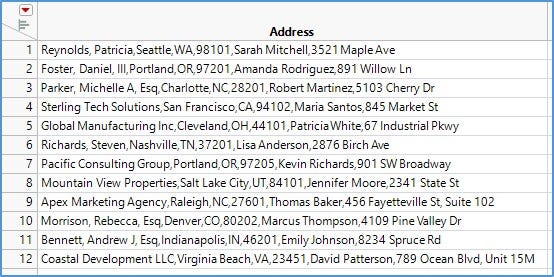
Consider a contact form where users enter name, phone, and address into separate fields. For display purposes, someone decides to concatenate these into a single string, separated by commas (e.g., "John Smith, 555-1234, 123 Main St, Apt 2, Springfield, IL." The thinking? It's easy to show on a webpage later.
The problem emerges when analysts need to extract individual phone numbers or group data by state. Because users also typed commas within their entries ("Apt 2, Springfield"), simple delimiter-based parsing fails. What could have been instant field access becomes a complex text extraction project involving regular expressions, manual inspection, and inevitable errors.
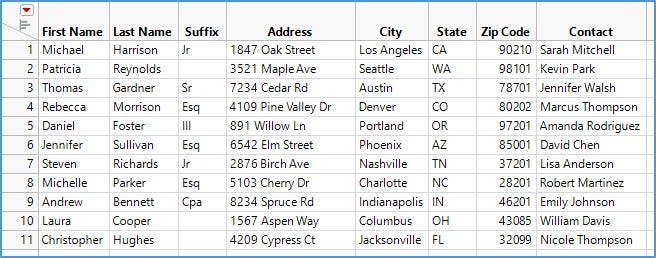
The principle here is universal: combining text is trivial; splitting it accurately is hard.
Takeaway tip: Store each piece of information in its own field. Let downstream users combine fields however they need in any order, any format without first having to reverse-engineer your storage decisions.
Before: Problem View
After: Improved View
The fixed-width file problem
Fixed-width text files persist in manufacturing and many industries for good reasons, since performance on large files is excellent (no parsing needed, just indexing), and rogue delimiters can't corrupt the data. These advantages matter to systems engineers managing data pipelines.
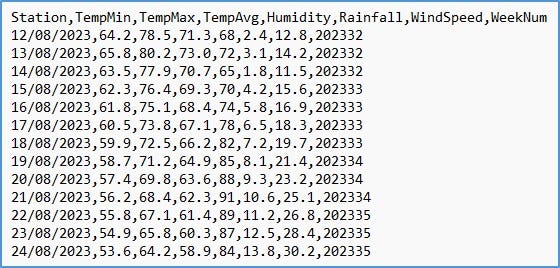
But from an analyst's point of view, fixed-width files are painful. Open one in a text editor and it initially appears tab-delimited. Only by revealing white space characters can you determine if it's actually fixed-width. Even then, you must somehow discover or deduce the width of each field before importing – a process that's frustrating and error-prone for all but the simplest data sets.
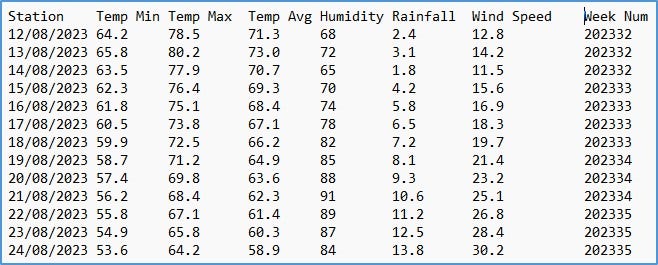
Takeaway tip: Don’t abandon fixed-width formats upstream where they provide value. Ensure that a delimited version is also made available for general use, preferably as far upstream as possible. When one person imports the fixed-width data once and exports it in a delimited format, it can save downstream users from tedium and errors.
Before: Problem View
After: Improved View
When flexibility becomes a liability
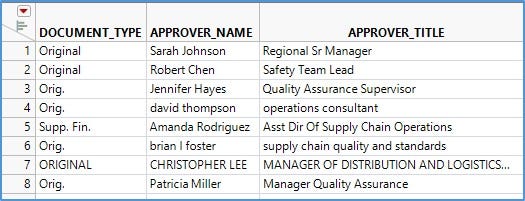
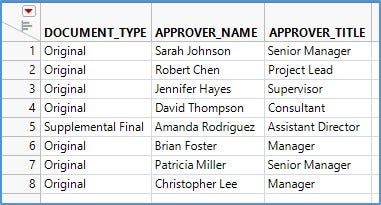
Free-form text entry offers ultimate flexibility but often at a high price. When users can type anything into a "Department" field, you get variations such as "Sales," "sales," "SALES," "Sales Dept," "Sls," and "Sales Department" – all referring to the same entity. Case sensitivity, punctuation, white space, abbreviations, and outright typos conspire to make subsequent analysis difficult.
Takeaway tip: Envision how clean data will actually be used. If you need to group by department, and there are only eight departments, why allow infinite text variations? Constrain input to those eight categories via dropdown menus. If you need detailed job titles but must also roll them up into broader categories, collect both, such as the specific title as free text and the category via controlled selection.
This isn't about restricting user expression. It's about allowing an appropriate level of flexibility. It’s always helpful to ask, "What granularity is actually necessary for downstream decisions?"
Before: Problem View
After: Improved View
Format inconsistency: The hidden time thief
Inconsistent formats plague date and time fields, ID numbers, phone numbers, and similar structured data. When users enter phone numbers freely, you get "+1-517-291-3250," "986.326.5171," "17485223436," and "(322)-279-4981." Each is valid, but requires different cleanup logic.
Takeaway tip: Collect country code, area code, and main number in separate input fields. Strip non-numeric characters on entry. Store these components separately, then concatenate them with consistent formatting for display. By doing so, users can still paste a full number into the first field, and it’s stored in a normalized structure.
The same principle applies to dates and times. Use unambiguous formats or separate the timestamp, day, month, and year, and time into distinct columns.
Spreadsheet structures that sabotage analysis
When raw data lives in spreadsheets, merged cells create a particular challenge. A single entry spanning multiple rows looks clean for presentation but becomes problematic for analysis. If you paste that data into a column-based analysis tool, you get blank cells where values should repeat. Filling those blanks accurately can be difficult, depending on the structure.
Takeaway tip: If data must reside in spreadsheets, store it in a column-centric way with no merged cells and no missing values. Each row should contain complete information. Create separate presentation views if needed, but keep the source data in a structure that exports cleanly to analytical tools.
The organizational conversation worth having
The tension between upstream convenience and downstream pain rarely gets addressed directly. Data architects are optimizing for their immediate needs, which can be system performance, storage efficiency, or rapid development. Analysts inherit the consequences but often lack the authority or access to change collection methods.
The most effective organizations make this tension obvious. They calculate the actual cost of cleanup across downstream users and compare it to the investment in better upstream design. They establish feedback loops so analysts can communicate pain points to architects. They recognize that data architecture is not just a technical decision but an economic one with multiplicative effects.
When you encounter data that looks like the examples discussed here, such as concatenated fields, fixed-width formats, or unrestricted entry that can create chaos, consider whether this is a one-time nuisance or a recurring problem. If recurring, the answer isn't better cleanup techniques. It's advocacy for better upstream decisions. Frame it in terms of aggregate time saved and organizational efficiency gained. The math usually speaks for itself.
For those who must work with messy data today, the quality of your data cleaning tools matters significantly. Whether you write code, use point-and-click interfaces, or combine approaches, look for platforms that make iterative cleanup less painful and transformation logic more transparent. Time saved on data prep is time available for the insights that actually matter.
Clean data does not happen by accident.
Use these checklists to close upstream and downstream gaps before analysis begins.