Individual and Moving Range Chart
What is an IMR (or X-MR) chart?
Individual and moving range charts (sometimes referred to as I and MR charts, IMR charts, or X-MR charts) are a type of control chart used to monitor processes where data are collected as individual measurements. These charts are particularly useful when subgrouping is not possible or practical. Like all control charts, IMR charts can identify special cause variation in a process. Any point outside of the control limits is an indicator of special cause variation. These points are often discussed as “out-of-control” points.
What are the components of IMR charts?
An IMR chart is made from two charts:
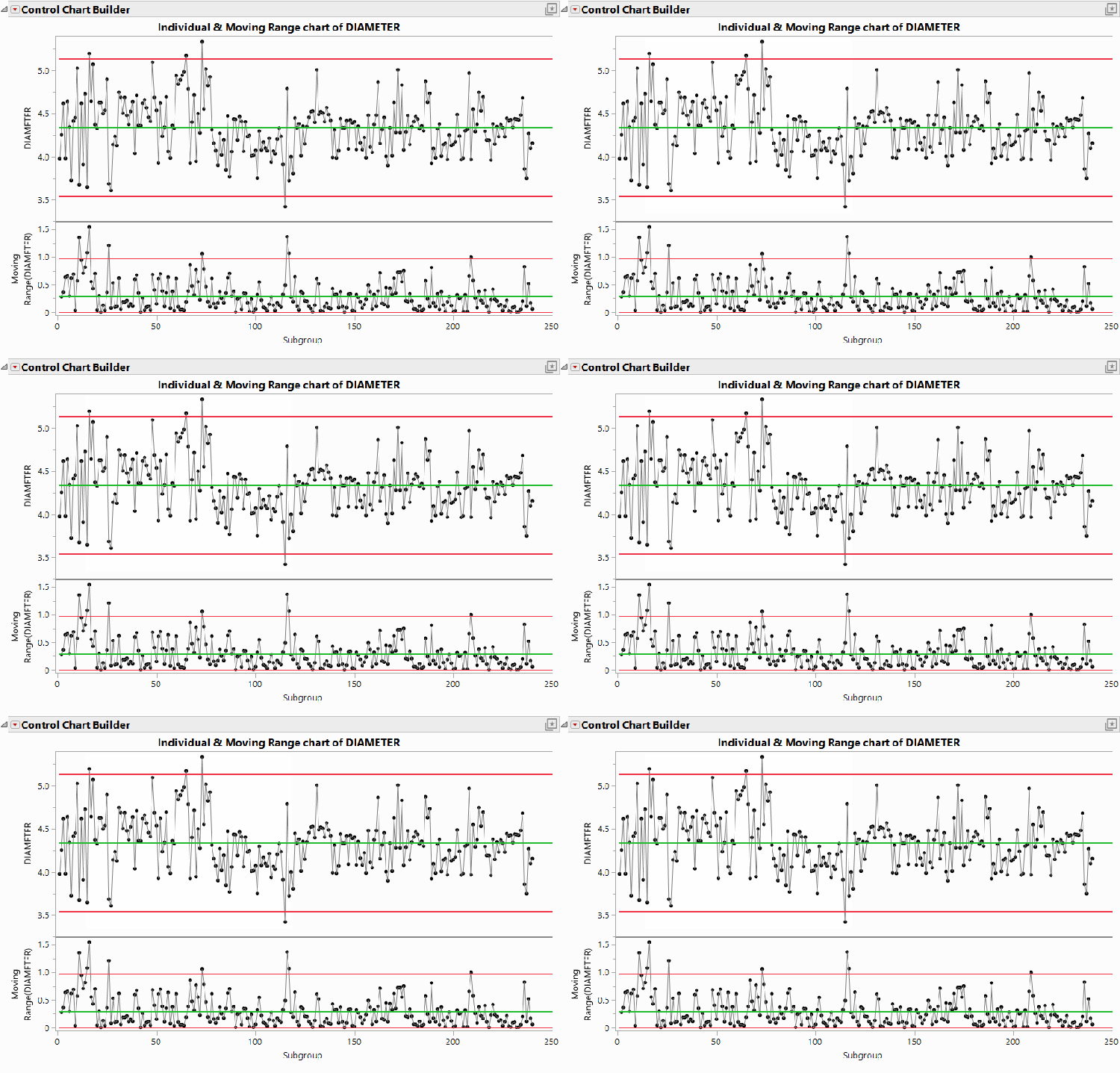
- Individuals chart: This chart, which is typically the top chart in the IMR group, plots each data point in time order. The green center line represents the process average, and the red lines represent control limits. Any point falling outside the zone created between the control limits, such as the flashing points in the Diameter example below, is considered out-of-control, and would be a signal to begin process improvement work.
- Moving range chart: Generally shown as the bottom chart of an IMR chart, the moving range chart plots the range between consecutive observations. The green center line represents the average moving range of all pairs of consecutive points. The red control limits are based on the short-term variability inherent in the data.
Learn how to create an individuals and moving range (I-MR, X-MR) control chart in JMP
https://www.youtube.com/watch?v=8F75NCf9f7A&list=PLgjnRjSuvqgfygwFXK3mdAHCR7MDgGluL&index=1
- To see more quality and reliability JMP tutorials, visit JMP's Quality and Reliability playlist on YouTube.
- To follow along using the sample data included with the software, download a free trial of JMP.
What are the components of IMR charts?
An IMR chart is made from two charts:
- Individuals chart: This chart, which is typically the top chart in the IMR group, plots each data point in time order. The green center line represents the process average, and the red lines represent control limits. Any point falling outside the zone created between the control limits, such as the flashing points in the Diameter example below, is considered out-of-control, and would be a signal to begin process improvement work.
- Moving range chart: Generally shown as the bottom chart of an IMR chart, the moving range chart plots the range between consecutive observations. The green center line represents the average moving range of all pairs of consecutive points. The red control limits are based on the short-term variability inherent in the data.
Calculations of IMR charts
The basics of the IMR chart calculations are as follows:
- Individuals chart: The center line of the individuals chart is the average of all the values. The control limits are plus or minus three times an estimator of sigma. This estimator is created by multiplying the average moving range between each set of consecutive points by a bias correction factor known as the $\mathrm{d}_2$ control chart constant. For an individuals chart, the appropriate $\mathrm{d}_2$ value is 1.128.
- Moving range chart: The center line of the moving range is drawn at the average moving range between each set of consecutive points. The control limits on the moving range chart are also based on the concept of a bias-corrected estimator. In this case, the upper control limit is the $\mathrm{D}_4$ control chart constant, which is 3.268 for an IMR chart, multiplied by the average moving range. The lower control limit is set at 0.
Note: The numbers 1.128 and 3.268 above are rounded values. Software typically uses values of these numbers that are not rounded. IMR charts created manually will therefore differ slightly compared to those done by software.
Take a deeper dive
More detail and specific formulas for IMR chart calculations can be found in Section 2.2 of JMP’s complimentary Statistical Process Control course.
Purpose and usage of IMR charts
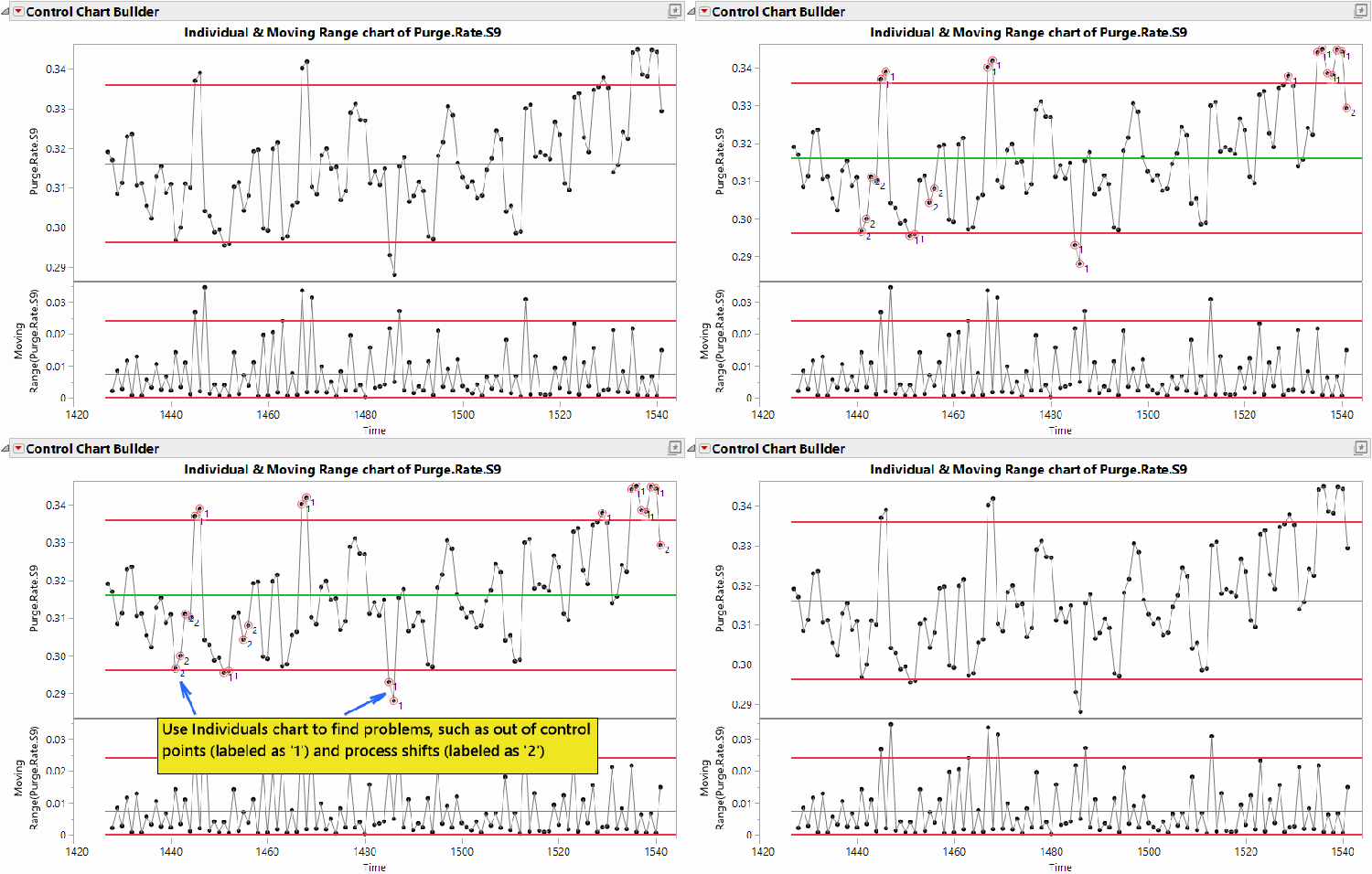
Control charts are used to find problems in a process, specifically whether the mean or the variance of the process has changed. To do this, control charts help differentiate special cause variation from common cause variation, highlighting specific points where the process has changed.
The generally accepted method for using an IMR chart is to focus on the individuals section to look for process problems. While the moving range chart could be used to determine process changes, it also inherently contains many false signals. Because of this, and because all the information about process shifts is contained in the individuals chart, as long as the moving range chart does not show most points being out of control, the individuals chart is generally the only chart in the IMR chart that practitioners monitor and respond to.
When to use IMR charts
You should use IMR charts when data are collected as individual measurements, such as when the weight of each widget is measured in a manufacturing process that uses single-piece flow production. Using control charts can be helpful in discovering and highlighting process problems early, when intervention can give you the best chance to avoid larger issues that can arise when you’re unaware of them. IMR charts are simple to construct and interpret, and they can be particularly effective for processes with low or high data-collection frequency.
IMR chart example
To help us better understand the concepts introduced above, let’s look at an example.
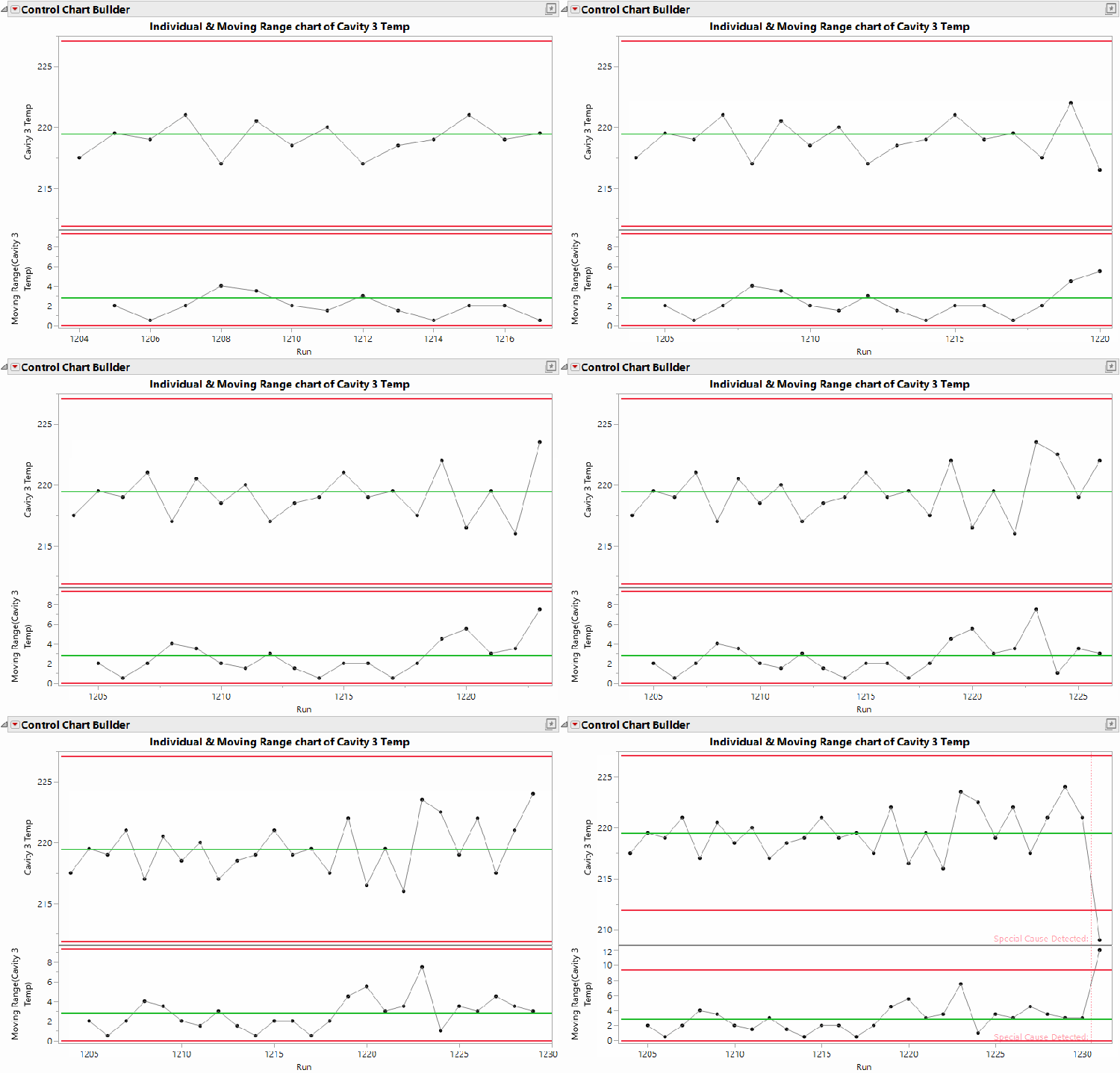
The company Red Triangle Widgets recently encountered a problem related to its injection molding process. Specifically, the thermocouple on one of the cavities in the process had been failing. As part of the solution, Red Triangle Widgets implemented a control chart to track the temperature of that cavity for each individual run. In the example below, you’ll notice that the team stops the process and investigates when the temperature drops just after Run 1,230. This discovery helped them diagnose and solve a separate issue with the process before the company made any defects.