Multivariate Control Chart
What is a multivariate control chart?
A multivariate control chart is used to control multiple processes on one control chart. It takes advantage of the correlation among the multiple processes.
Why use multivariate control charts?
Shewhart charts are good for monitoring one process at a time. Often, more than one characteristic is measured per subgroup. For example, you might want to measure percent impurities for multiple types of impurities, chemical compositions in a batch of chemicals, physical characteristics of a sample, or air pollutants at a specific point in time. These characteristics are often correlated.
Univariate Shewhart charts can be used to control each component’s variability. Multivariate control charts can be used to control the correlation, to make sure that the relationship between the variables is stable over time.
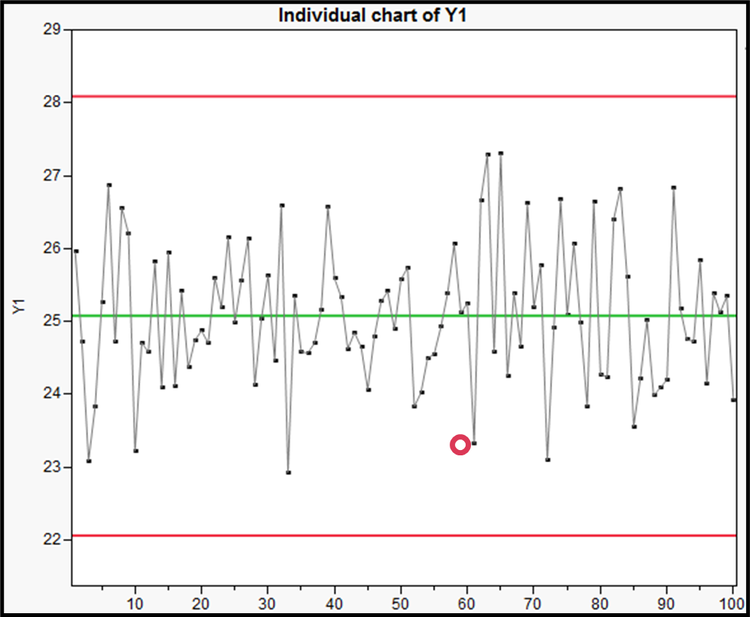
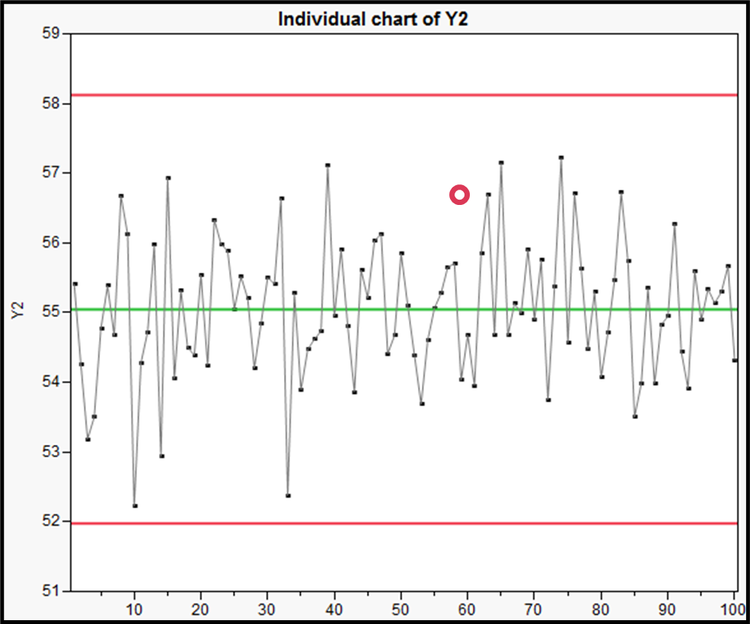
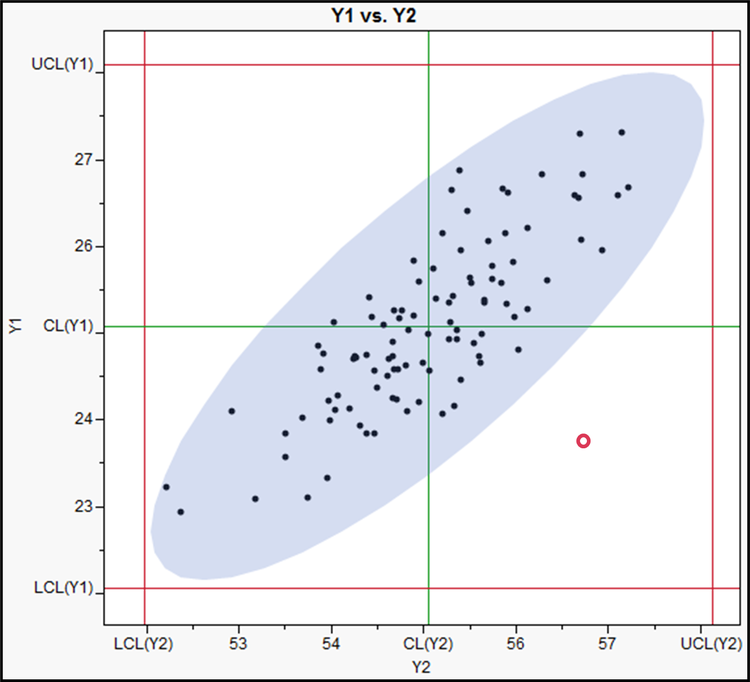
The graph on the far right of Figure 1 shows 100 observations from two highly correlated variables. The correlation coefficient is about 0.8. When the process is stable, the observations stay within the 99% density ellipse. The process can go out of control with a shift in the mean or variance of either variable or with a shift in the correlation between the variables. The two univariate charts on the left pick up a shift in the mean or variance of the variables, but only the multivariate chart signals a shift in the correlation structure. The red observation is in control on the univariate control charts but is an unusual observation that doesn’t follow the correlation. For example, tall women tend to have long feet, short women tend to have small feet. In a system measuring women’s heights and foot lengths, a tall woman with small feet is an example of a point that would fall outside of the correlation structure.
What is Hotelling’s T2 chart?
One measure of how scattered the data are around their mean, or centroid, is given by Hotelling’s T2 statistic. Hotelling’s T2 is analogous to the Student's t statistic in the univariate case. Hotelling’s T2 measures the distance of the data points to the centroid of the data cloud in n dimensional space, taking the correlation into account. When the distance between an observation and the centroid is larger than expected, the chart will signal.
For row i, the statistic is calculated as $T_i^2 = (\mathbf{y}_i - \mu)^{\prime} \Sigma^{-1} (\mathbf{y}_i - \mu)$, where $\Sigma$ is the covariance matrix of the Y variables, $\mu$ is the true mean vector, and $\mathbf{y}_i$ is the vector of observations in the ith row. The T2 statistics can be plotted on a control chart with appropriate limits. (For details on limit calculation, see section 4.2 of Statistical Process Control Course - JMP User Community.)
Example of a T2 control chart
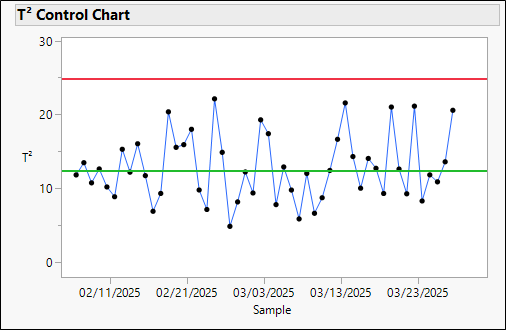
Suppose you work for a publishing company that prints paperback books. You are interested in controlling the process that prints the covers for the books. Each day, you print a test page on the same paper stock used to cover your books. The test page contains regions that are printed in seven colors (red, orange, yellow, green, blue, indigo, and violet). It also contains three shapes: a rectangle whose height is four times its width, a square, and a rectangle whose width is four times its height.
Every day, you use a colorimeter to measure the wavelength of reflected light from the seven colored rectangles and calipers to measure the height and width of the three rectangles, for a total of 13 variables measured. We will use simulated data from this process to illustrate the T2 and other multivariate control charts.
What is a model-driven multivariate control chart?
A model-driven multivariate control chart (MDMVCC) enhances the T2 chart with automatic model selection based on principal components analysis (PCA) of the data, a control chart on the normalized distance from each data value to the PCA model (DModX), and a contribution proportion plot.
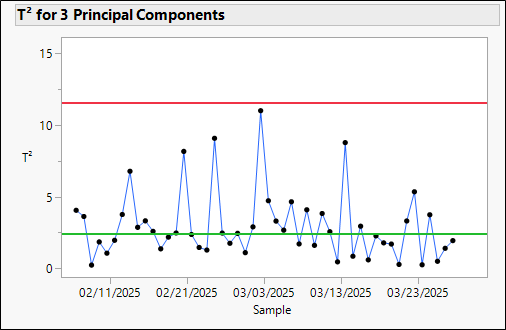
A T2 chart controls all the data. A T2 chart on the important principal components controls just the important directions in the data and not the noise components. The MDMVCC fits a PCA model to the data, then retains the number of components that explain at least 85% of the variability in the data, then calculates a T2 statistic on those new variables. (For details on model-driven multivariate control charts, see section 4.2 of Statistical Process Control Course - JMP User Community.)
Learn how to create a model-driven multivariate control chart in JMP.
https://www.youtube.com/watch?v=Y3ciILGN2Vo
- To see more quality and reliability JMP tutorials, visit JMP's Quality and Reliability playlist on YouTube.
- To follow along using the sample data included with the software, download a free trial of JMP.
Example of model-driven multivariate control chart
First, let’s perform PCA on the 13 variables. The analysis tells us that instead of 13 independent variables, there are three strong directions in the variable space.
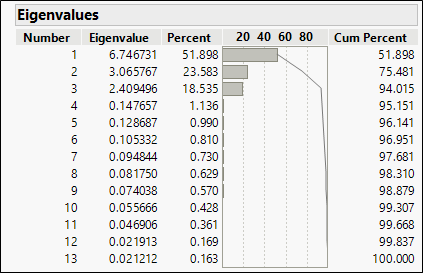
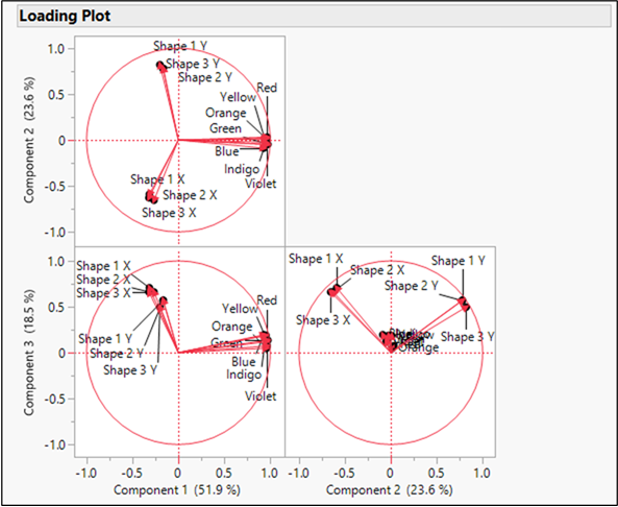
Examination of the loading plot tells us that these three dimensions correspond to the seven color variables, the three vertical measurements, and the three horizontal measurements. PC1 describes the color variables vs. the length and width variables; PC2 describes the vertical vs. the horizontal variables; and PC3 describes the vertical and horizontal variables further.
These three components explain over 94% of the variation in the data. We can use a T2 chart on the three important components to control the process mean vector.
It can be useful to also plot the residual values from the principal component model. DModX is the scaled squared prediction error and will help monitor changes in both the mean level and correlation of the multivariate process.
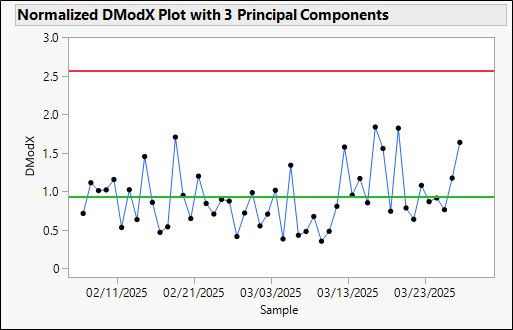
Let’s introduce a change in the distributions used to simulate the data. There are 50 observations in the in-control data. In the out-of-control data, we’ll introduce a change in the correlation matrix at Observation 51 and a change in the mean vector at Observation 81. The in-control data are used to set the control limits. The T2 chart limits change depending on whether the correlation matrix can be considered unknown (Phase I) or known (Phase II).
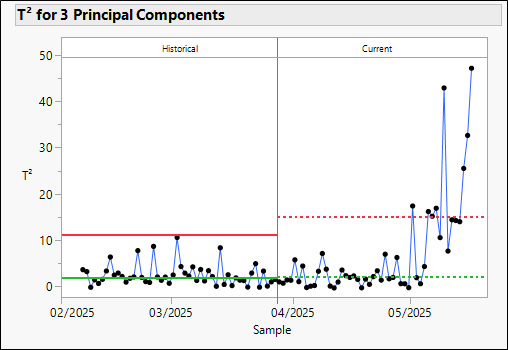
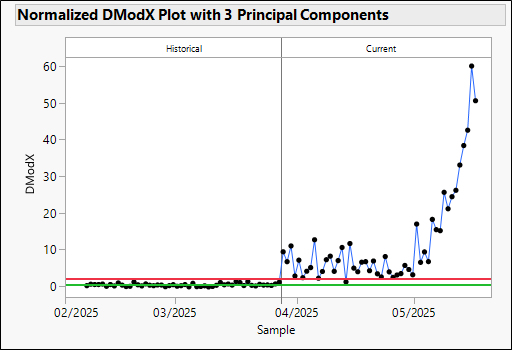
In JMP, you can investigate the signals directly from the chart.
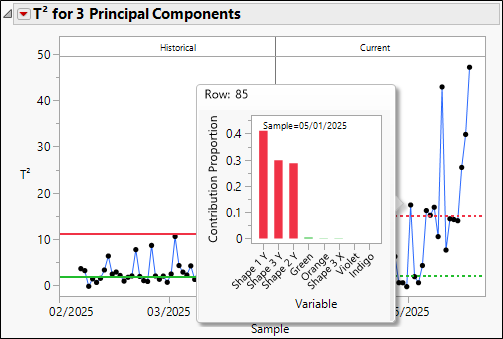
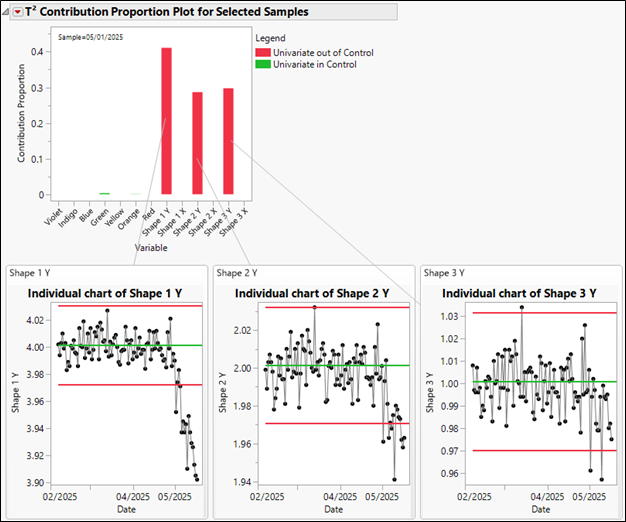
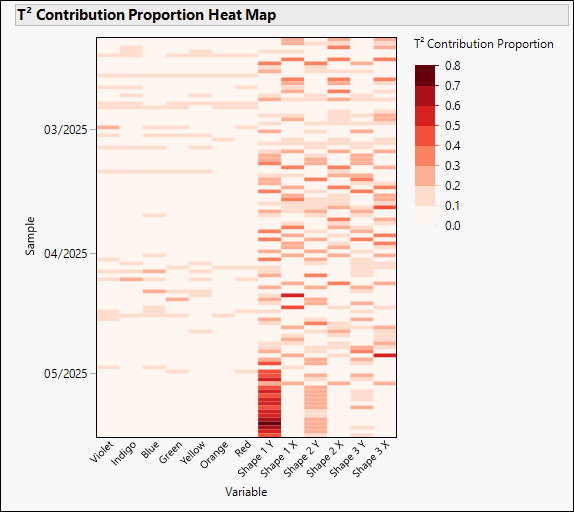
You can also examine how much of the T2 statistic is due to each component. All the data are shown in a heat map.