Check Variable Requirement and Usage
Clicking  in any report opens the following :
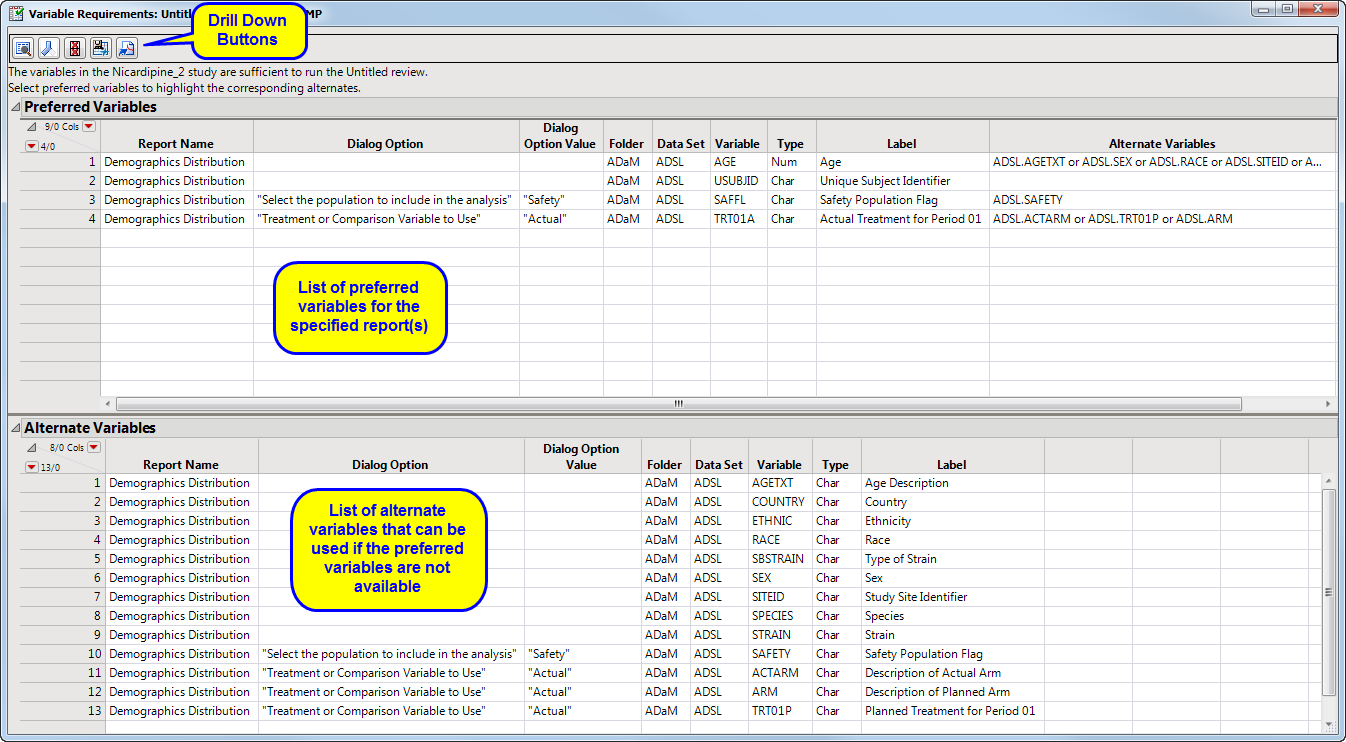
This table lists the variables required by JMP Clinical to run the specified report(s). It lists both preferred variables and acceptable alternates.
down options include:
| • | Hide/Show Report Details: The  button toggles between showing more or less details. button toggles between showing more or less details. |
| • | Hide/Show Alternate Variables: The  button alternates between showing or hiding the alternate variables table. button alternates between showing or hiding the alternate variables table. |
| • | Hide/Show Satisfied Requirements: This button toggles between two states Click  to hide the satisfied variable requirements and show only the missing required variables. Click to hide the satisfied variable requirements and show only the missing required variables. Click  to show the satisfied variable requirements. to show the satisfied variable requirements. |
| • | Save Data Tables: Click  to save the Variables Requirements data as a JMP table. to save the Variables Requirements data as a JMP table. |
| • | Save as PDF: Click  to save the Variables Requirements data as a PDF. to save the Variables Requirements data as a PDF. |