 Additional Example of the Text Explorer Platform
|
1.
|
|
2.
|
Select Rows > Color or Mark by Column.
|
|
3.
|
|
4.
|
Select Analyze > Text Explorer.
|
|
5.
|
|
6.
|
From the Stemming list, select Stem All Terms.
|
|
7.
|
From the Tokenizing list, select Basic Words.
|
|
8.
|
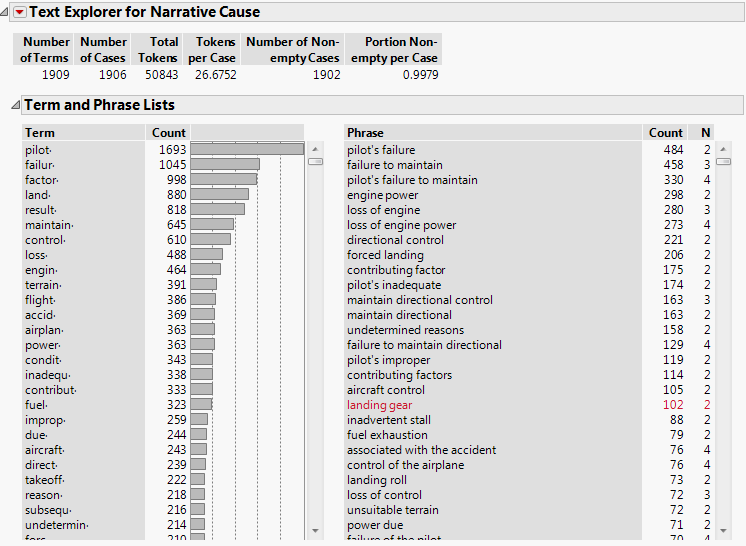
Click OK.
|
|
9.
|
Right-click on pilot· in the Term List and select Select Rows.
|
|
10.
|
Right-click on pilot· and select Add Stop Word.
|
|
11.
|
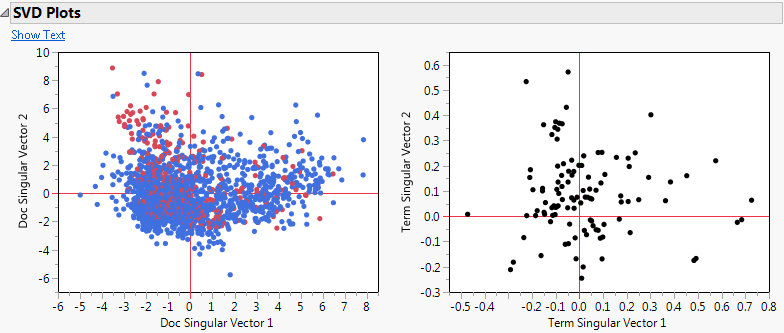
 From the red triangle menu next to Text Explorer for Narrative Cause, select Latent Semantic Analysis, SVD. From the red triangle menu next to Text Explorer for Narrative Cause, select Latent Semantic Analysis, SVD. |
 In the Specifications window, type 50 for Minimum Term Frequency.
|
13.
|
 Click OK. Click OK. |
|
14.
|
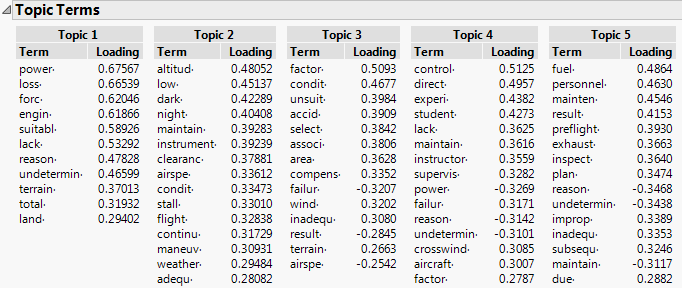
 From the Text Explorer red triangle menu, select Topic Analysis, Rotated SVD. From the Text Explorer red triangle menu, select Topic Analysis, Rotated SVD. |
 Type 5 for Number of Topics.
|
16.
|
 Click OK. Click OK. |