
 Example of Bootstrap Forest with a Continuous Response
|
1.
|
|
2.
|
Select Analyze > Predictive Modeling > Bootstrap Forest.
|
|
3.
|
|
4.
|
|
5.
|
|
6.
|
Click OK.
|
|
7.
|
(Optional) Select Suppress Multithreading and enter 123 next to Random Seed.
|
|
8.
|
Click OK.
|
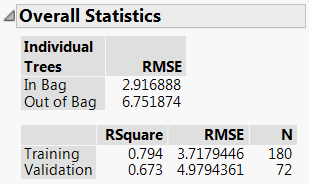
Figure 6.5 Overall Statistics
|
9.
|
Click the red triangle next to Bootstrap Forest for Percent body fat and select Column Contributions.
|
Figure 6.6 Column Contributions
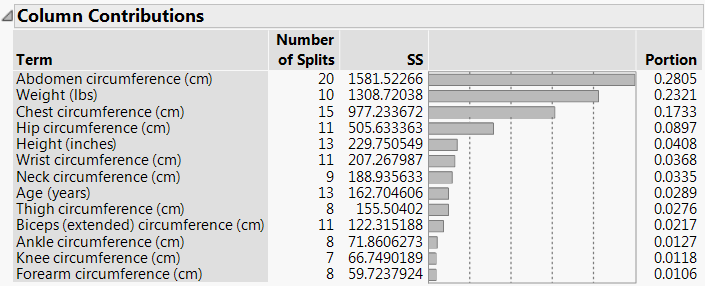
The Column Contributions report suggests that Abdomen circumference (cm), Weight (cm), and Chest circumference (cm) are the strongest predictors for Percent body fat.