Acceptance Single Sampling Plan
Use the Acceptance Single Sampling Plan Explorer to explore acceptance probabilities for a binomial or lot sampling plan. Select DOE > Sample Size Explorers > Quality > Acceptance Single Sampling Plan.
Acceptance Single Sampling Plan Explorer Settings
Set study assumptions and explore sample sizes by using the radio buttons, text boxes, and menus. The profiler updates as you make changes to the settings. Alternatively, you can change the settings by dragging the cross hairs on the profiler curves.
Sampling Type
Enables you to specify Lot Sampling or Binomial Sampling.
Lot Sampling
Specifies an acceptance plan based on a fixed lot size.
Binomial Sampling
Specifies an acceptance plan for a continuous process or other situation where the binomial distribution is appropriate.
AQL
Specifies the acceptable quality level (AQL). The AQL is the poorest quality that is acceptable. Enter the highest proportion of defects, on average, that is acceptable. One desires a sampling plan with a high probability of accepting a lot with a defect rate less than or equal to the AQL. The AQL is not a property of the sampling plan.
Producer’s Risk (Alpha)
Displays the Type I error. This is the probability of rejecting a lot that has a defect level equal to the AQL. This is also known as the producer’s risk. This value updates as you make changes to the acceptance plan.
RQL
Specifies the rejectable quality level (RQL). Enter the highest proportion of defects that is acceptable for an individual lot. RQL must be greater than or equal to AQL. RQL is also known as the limiting quality level (LQL) or the lot tolerance percent defective (LTPD). The consumer desires a sampling plan with a low probability of accepting a lot with a defect rate greater than or equal to the RQL.
Consumer’s Risk (Beta)
Displays the Type II error. This is the probability of accepting a lot that has a defect level equal to the RQL. This is also known as the consumer’s risk. This value updates as you make changes to the acceptance plan.
Target Variable
Enables you to solve for the Sample Size, Number of Failures, or Fraction Defective for a specified Acceptance Probability, Producer’s Risk (Alpha), or Consumer’s Risk (Beta).
Acceptance Probability
Specifies the probability of accepting the lot given the sampling plan as defined.
Sample Size
Specifies the number of units from the lot for inspection.
Lot size
(Available only for Lot Sampling.) Specifies the size of the lot from which you are sampling.
Number of Failures
Specifies the number of allowable failures in the sample.
Fraction Defective
Specifies the expected fraction defective in the lot.
Acceptance Single Sampling Plan Explorer Profiler
The profiler enables you to visualize the impact of sampling plan assumptions on the acceptance probability. Interactive profiler changes to sample size, lot size, number of failures or the fraction defective update the calculated acceptance probability. To solve for sample size, number of failures, or the fraction defective for a specified Acceptance Probability, Producer’s Risk (Alpha), or Consumer’s Risk (Beta), use the target variable settings and click Go.
Acceptance Single Sampling Plan Explorer Options
The Explorer red triangle menu and report buttons provide additional options:
Simulate Data
Opens a data table of simulated data that are based on the explorer settings. View the simulated response column formula for the settings that are used. Run the table script to analyze the simulated data.
Make Data Collection Table
Creates a new data table that you can use for data collection. The table includes scripts to facilitate data analysis.
Remember Settings
Saves the current settings to the Remembered Settings table. This enables you to save a set of alternative study plans. See Remembered Settings in the Sample Size Explorers.
Reset to Defaults
Resets all parameters and graphs to their default settings.
The Profiler red triangle menu contains the following option:
Optimization and Desirability
Enables you to optimize settings. See “Desirability Profiling and Optimization” in Profilers.
Note: The sample size explorer report can be saved as a *.jmpdoe file. Open the file to return to the explorer. An alert prompts you to save the file.
Example of the Acceptance Single Sampling Plan Explorer
In this example, use the Acceptance Single Sampling Plan Explorer to explore the difference in sample sizes for two acceptance probabilities for a specified sampling plan. For a lot of size 1,000, allow 1 failure, and assume a fraction defective of 0.035.
1. Select DOE > Sample Size Explorers > Quality > Single Sampling Plan.
2. Leave Sampling Type set to Lot Sampling.
3. Leave AQL and RQL set to the defaults.
4. Leave Target Variable set to Sample Size.
5. Leave Acceptance Probabilty set to 0.80.
6. In the profiler, set Lot Size to 1000.
7. In the profiler, set Number of Failures to 2.
8. In the profiler, set Fraction Defective to 0.035
9. Click Go.
10. Click Remember Settings to save the results showing that 44 samples are needed for an 80% acceptance probability for the specified sampling plan.
11. In the window, leave the default name and click OK.
12. Set the Acceptance Probabilty to 0.90.
13. Click Go.
14. Click Remember Settings to save the results showing that 32 samples are needed for a 90% acceptance probability for the specified sampling plan.
15. In the window, leave the default name and click OK.
Figure 29.14 Acceptance Single Sampling Plan Explorer
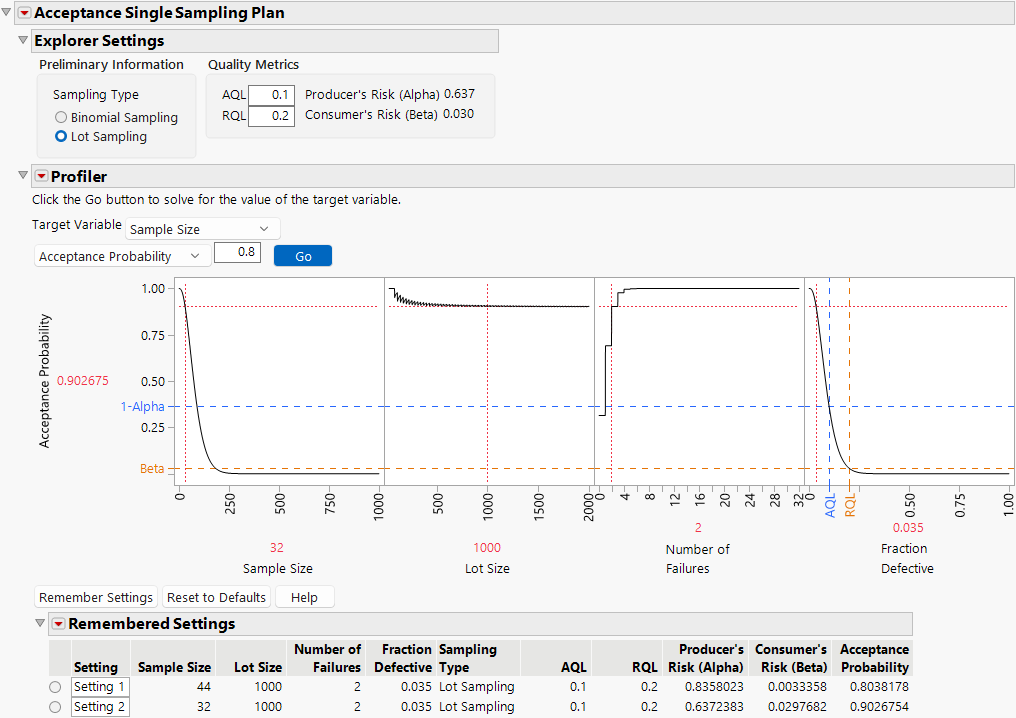
Compare the 32 and 44 sample sizes in terms of producer and consumer’s risks. The larger sample size has a higher producer’s risk and a lower consumer’s risk.
Statistical Details of the Acceptance Single Sampling Plan Explorer
The acceptance probability is computed as the probability of observing at most, the number of failures allowed under the current sample size and fraction defective. The probability is computed with the binomial distribution for binomial sampling and the hypergeometric distribution for lot sampling.
The value of alpha is computed as the probability of observing at least the allowed number of failures under the current sample size and AQL.
The value of beta is computed as the probability of observing at most, the number of failures allowed under the current sample size and RQL.