Publication date: 07/15/2025
Calculate Derivatives of JMP Functions
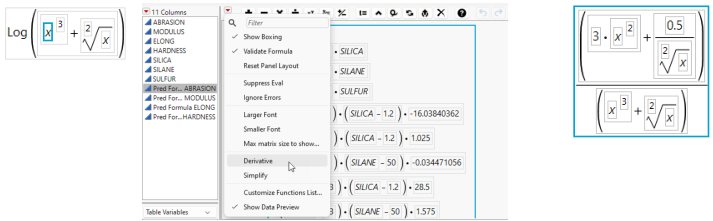
The Formula Editor can find and display the derivative of a function. The derivative is found with respect to the function argument (a single variable name) that you highlight. Therefore, to differentiate with respect to x, x must be one of the arguments in the expression.
To calculate a derivative, follow these steps:
1. Enter a function.
2. Highlight a variable.
3. Select Derivative from the red triangle next to the keypad.
Figure 7.15 Using the Derivative Option
Want more information? Have questions? Get answers in the JMP User Community (community.jmp.com).