Example of a Packed Bar Chart
|
Data |
This example uses data from the National Oceanic and Atmospheric Administration on the economic impact of weather and climate events in the United States during the years 1980 to 2018. |
|
Techniques |
The example uses a packed bar chart with 10 primary categories. |
|
Goal |
The goal of this example is to create a packed bar chart that shows the events that had the greatest economic impact. |
1. Select Help > Sample Data Folder and open Billion Dollar Events.jmp.
2. Select Graph > Graph Builder.
3. Select Unique Event and drag it to the Y zone.
4. Select Cost and drag it to the X zone.
5. Select the Bar element ( ).
).
6. In the Bar options panel:
a. For the Bar Style, select Packed.
b. Change Packed Primaries to 10.
c. Move the Packed Labeling slider to the left until it is approximately midway on the slider bar.
Figure 4.23 Weather Events With Large Economic Impacts in a Packed Bar Chart
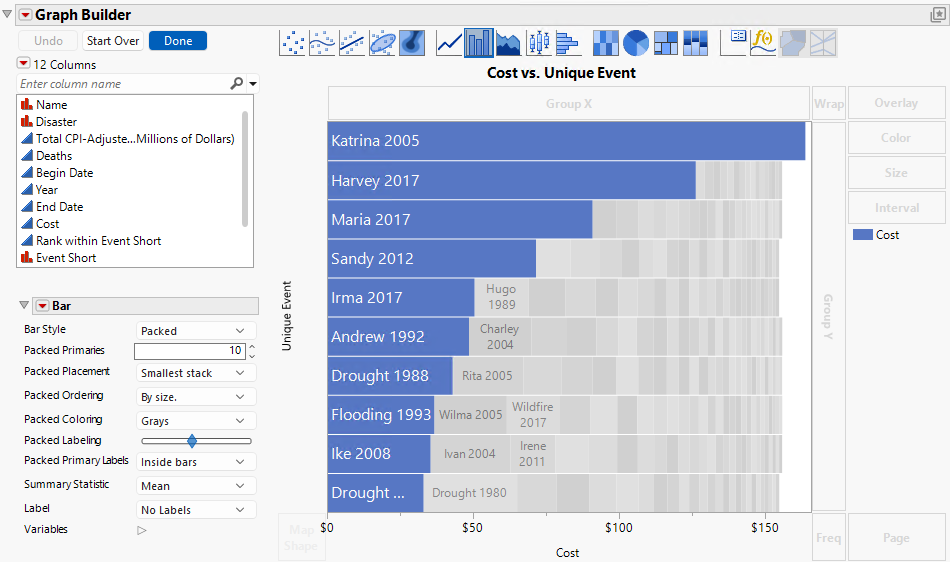
The top 10 categories appear as a bar chart with blue bars. These are the “Packed Primaries” that you set to 10 in the options. Secondary categories are labeled and in gray. You can hover over any bar for more details.
In this graph, you can clearly see that Katrina in 2005 had the largest financial impact of any storm that hit the United States between 1980 and 2018. The 2017 hurricanes, Harvey and Maria, also had large financial impacts.