Example of Cluster Variables Platform for Dimension Reduction
In this example, you use the Cluster Variables platform as a dimension-reduction tool for modeling. The data table contains 667 variables that can be used to predict the response variable, and you want to reduce this number.
Cluster Variables
1. Select Help > Sample Data Folder and open Prostate Cancer.jmp.
2. Select Analyze > Clustering > Cluster Variables.
3. Select the Proteins column group from the Select Columns list and click Y, Columns.
4. Click OK.
5. Click the Variable Clustering red triangle and select Save Cluster Components.
A column group that contains 72 formula columns is added to the data table.
6. Click the gray disclosure icon next to Color Map on Correlations.
7. (Optional.) Right-click the color map and select Frame Size.
8. (Optional.) Type 850 in the boxes next to Horizontal and Vertical, and click OK.
Figure 17.5 Color Map on Correlations

The color map of the correlations between the 667 variables places variables that belong to the same cluster adjacent to each other.
Figure 17.6 Cluster Summary (Partial Report)
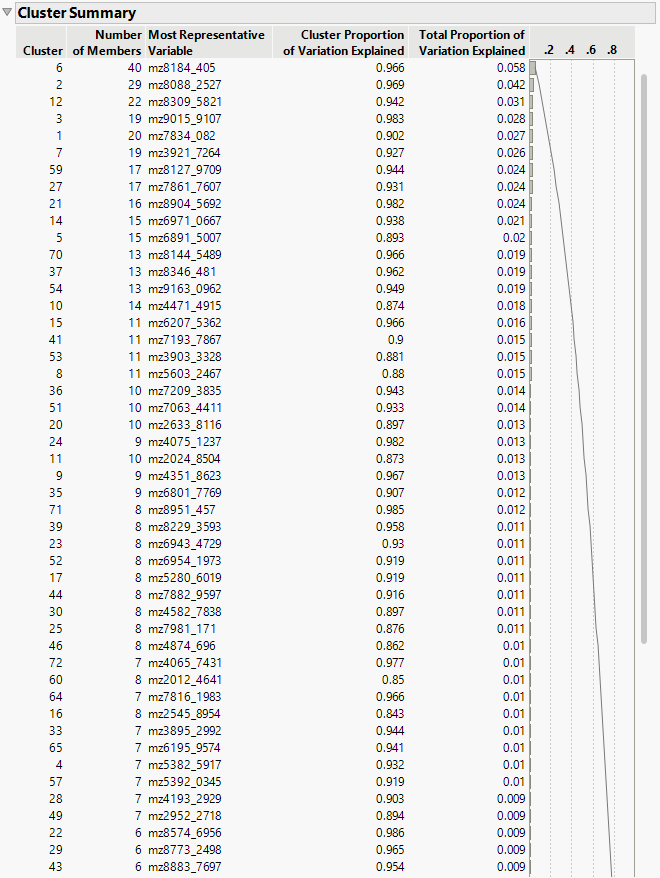
Figure 17.7 Cluster Members (Partial Report)
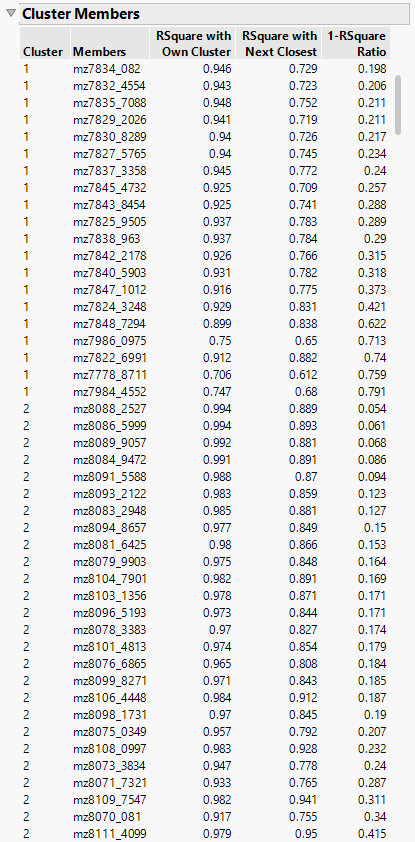
The Cluster Summary and Cluster Members reports show that the variables are clustered into 72 groups, so there are 72 Cluster Component variables. These 72 variables are also added to the data table as a new column group of formula columns.
Fit Models
To predict PSA, you can fit a model using either:
• All 667 continuous variables as predictors.
• The 72 Cluster Components as predictors.
Because the number of predictors (667) exceeds the number of observations (165) in the original data, a standard least squares model cannot be fit. However, by applying variable clustering as a dimension-reduction technique, the data are condensed into 72 Cluster Components, which makes it possible to fit a least squares model.
1. Click the Variable Clustering red triangle and select Launch Fit Model.
2. Select PSA and click Y.
Notice that the Most Representative Variables for each of the 72 clusters have been entered in the Construct Model Effects list.
3. In the Fit Model window, select all variables in the Construct Model Effects window and click Remove.
4. Select the Cluster Components group and click Add.
5. Click Run.
Figure 17.8 Fit Least Squares Report for Model with Cluster Components as Predictors
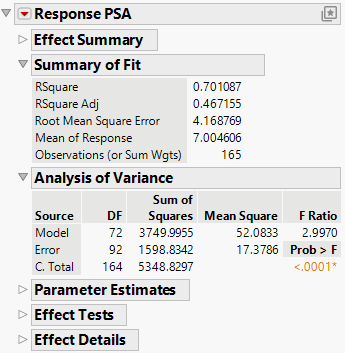
The Least Squares report shows that the model that uses the 72 Cluster Components as predictors performs reasonably well (p-value < 0.0001) with an adjusted RSquare of 0.467. These values indicate that the predictors provide explanatory power for the response. Reducing 667 variables to 72 components results in some loss of information, but the model remains effective and demonstrates that variable clustering is a valuable technique for dimension reduction in high-dimensional predictive modeling.