Example of Concatenating Data Tables and Table Variables
Suppose that two cancer trials were conducted at two different hospitals. The data of one trial are in the Cancer1.jmp data table, and the data for the other trial are in the Cancer2.jmp data table.
To consolidate the data and the variables into one JMP data table, follow these steps:
1. Select Help > Sample Data Folder and open Cancer1.jmp and Cancer2.jmp.
Notice that there are two distinct table variables: Dosage Amount and Location. In the concatenated table, columns are created for these two table variables.
2. From the Cancer1.jmp data table, select Tables > Concatenate.
3. Select Cancer2 and click Add.
4. Click OK.
Figure 6.19 Data and Variables Concatenated
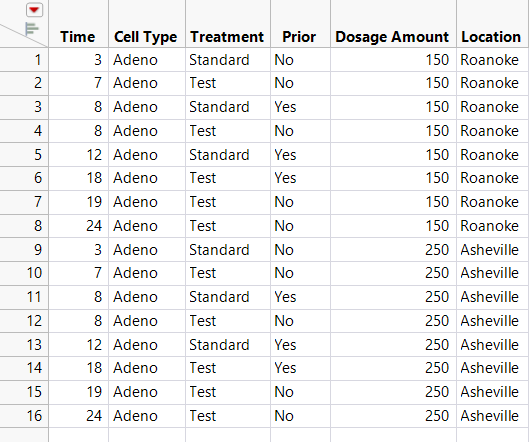
The data and the variables are concatenated. The variables appear as columns in the concatenated table. The notes from each data table are added to the new data table as table variables.