Example of Creating a Summary Table with Groups
Suppose a researcher is working with Companies.jmp, which groups companies by Type and Size. The researcher wants to perform the following tasks:
• Create a table that shows the average profit per employee for small, medium, and big computer and pharmaceutical companies. In other words, create a table that contains a row for each company size and a column for the mean profit per employee of each type of company.
• Create the table so that the cells hold the mean for the subgroup (defined by the intersection of the row and column).
To create a summary table with groups
1. Select Help > Sample Data Folder and open Companies.jmp.
2. Select Tables > Summary.
3. Select Size Co and click Group.
The researcher selects Size Co as the grouping variable because the researcher wants the values in that column to become rows in the new table.
4. Select profit/emp and click Statistics.
5. Select Mean.
6. Select Type and click Subgroup.
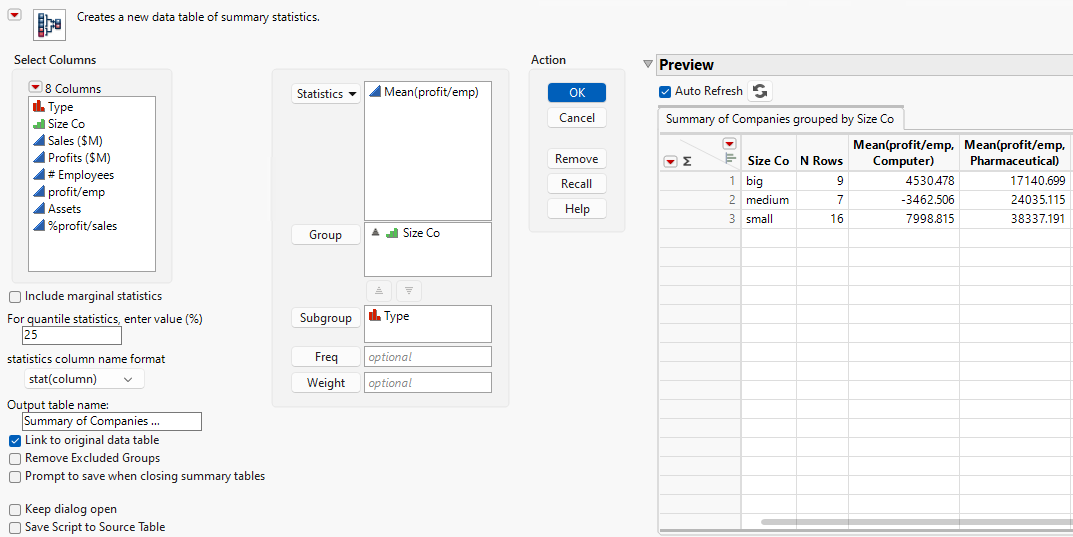
This tells JMP to create a column for the average profit per employee (Mean(profit/emp)) for each level (computer, pharmaceutical) of subgroup variable (type).
Figure 8.5 Summary Statistics for a Subgroup
Note: The summary table is named after the Group column name. If the column name contains characters that are not allowed in file names, a hyphen is substituted for the special character.