Example of the Model Averaging Option
This example illustrates the Model Averaging option in the Stepwise personality of the Fit Model platform.
1. Select Help > Sample Data Folder and open Fitness.jmp.
2. Select Analyze > Fit Model.
3. Select Oxy and click Y.
4. Select Runtime, RunPulse, RstPulse, and MaxPulse and click Add.
5. For Personality, select Stepwise.
6. Click Run.
7. Click the Stepwise red triangle and select Model Averaging.
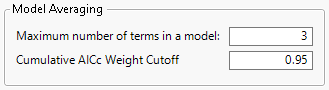
8. Type 3 for the Maximum number of terms in a model.
9. Keep 0.95 for the Cumulative AICc Weight Cutoff.
Figure 5.24 Model Averaging Window
10. Click OK.
Figure 5.25 Model Averaging Report

There are 14 models considered: four single-term models, six two-term models, and four three-term models. Recall that the maximum number of terms that you specified for any model was 3. Of these 14 models, five have a scaled AICcWeight greater than the specified cutoff of 0.95. In the Model Averaging report, the weighted average estimates and weighted standard errors over these five models appear for each parameter. The standard errors that are shown reflect the bias of the estimates toward zero.
11. Click Save Prediction Formula to save the prediction formula in the original data table.