Example Using Stepwise Regression
In this example, you use the Stepwise personality of the Fit Model platform to select variables for a linear regression model to predict oxygen uptake. Aerobic fitness can be evaluated by using a special test that measures the oxygen uptake of a person who is running on a treadmill for a prescribed distance. However, it would be more economical to find a formula that uses simpler measurements that evaluate fitness and predict oxygen uptake. To identify such an equation, measurements of age, weight, run time, and pulse were taken for 31 participants who ran 1.5 miles.
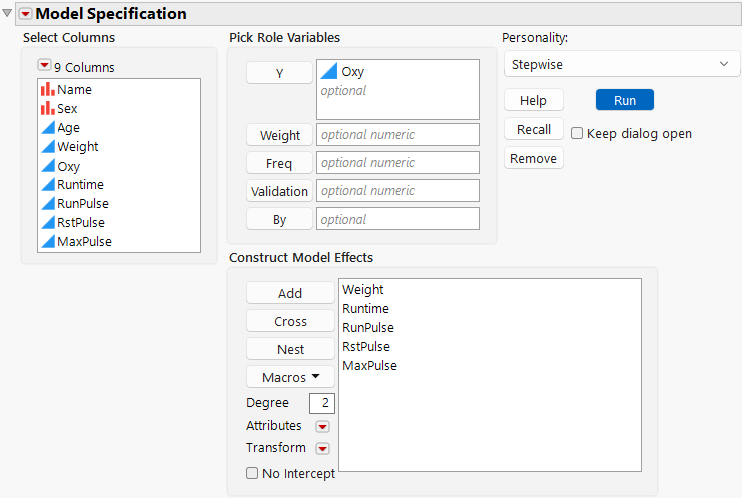
1. Select Help > Sample Data Folder and open Fitness.jmp.
2. Select Analyze > Fit Model.
3. Select Oxy and click Y.
4. Select Weight, Runtime, RunPulse, RstPulse, MaxPulse, and click Add.
5. For Personality, select Stepwise.
Figure 5.2 Completed Fit Model Launch Window
 Validation is available only in JMP Pro.
6. Click Run.
To build a prediction equation for oxygen uptake, use the options in the Stepwise report window to consider models with different combinations of effects.
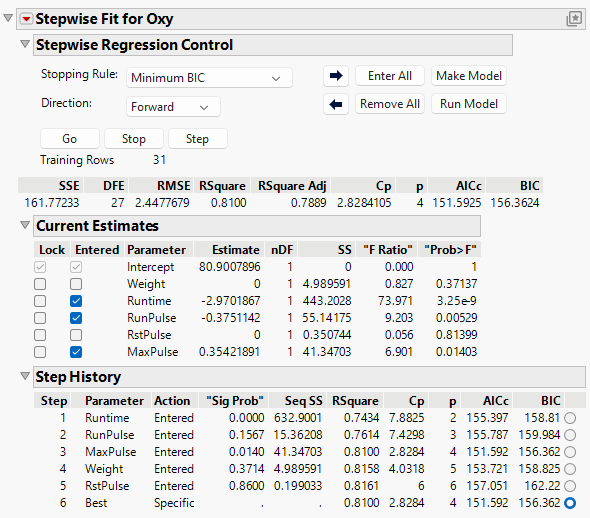
7. Click Go to use forward selection with a Minimum BIC stopping rule.
Figure 5.3 Completed Forward Selection
8. Click Run Model.
Figure 5.4 Standard Least Squares Model Report
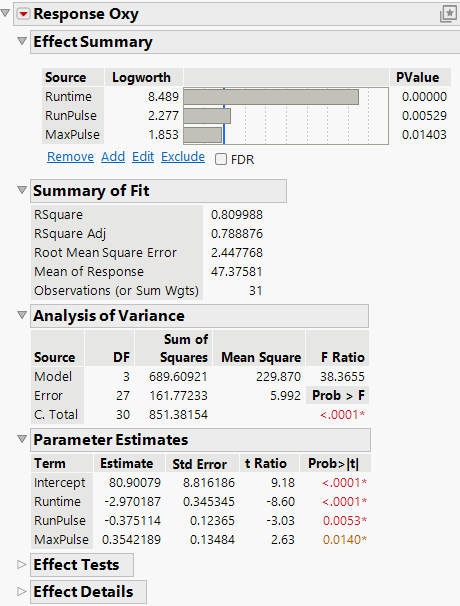
The stepwise procedure selected three of the five variables to include in the model. Change the variables that are selected in the Stepwise report and then click Run Model to add additional models to the model output for comparison.