Preferences for Internet Options
Internet Options specify settings for opening files from the internet.
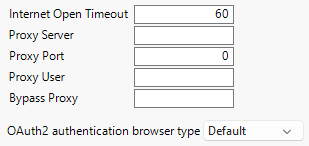
Figure 15.29 Internet Options
Preference | Description |
|---|---|
Internet Open Timeout | When you use Internet Open to open a web page, JMP waits the specified number of seconds before stopping the import due to an error. The default setting is 60 seconds. |
Proxy Server | Specifies the proxy host. http (or https) must be included with the specification. http is assumed if no protocol is used. |
Proxy Port | Specifies the port that is used to connect to the proxy host. If none is specified, the port is 1080 (for http) and 443 for all others (https). The default setting is 0. |
Proxy User | Specifies an optional user for the proxy. Not all proxy settings require a user. |
Bypass Proxy | Specifies an optional comma-separated list of hosts to bypass (that is, not going through a proxy). A user might want to filter out hosts that are behind the corporate firewall (which do not require a proxy). |
OAuth2 authentication browser type | Specifies the type of OAuth2 authentication browser. The default setting is Default. |