Preferences for the Columns Manager
The Columns Manager settings customize preferences for the Columns Manager.
Figure 15.12 Columns Manager Preferences
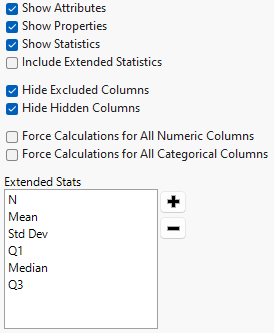
Preference | Description |
|---|---|
Show Attributes | Displays column attributes. This option is selected by default. |
Show Properties | Displays column properties. This option is selected by default. |
Show Statistics | Displays summary statistics for each column that includes Min, Max, N Missing, N Unique, a Distribution graph, and All Integers. Character columns have only a Distribution and N Unique. This option is selected by default. |
Include Extended Statistics | Displays the statistics that are specified by the Extended Stats field in addition to the base set of summary statistics. |
Hide Excluded Columns | Hides columns that have the excluded flag. This option is selected by default. |
Hide Hidden Columns | Hides columns that have the hidden flag. This option is selected by default. |
Force Calculations for All Numeric Columns | Specifies whether to calculate all numeric statistics for all numeric columns. This option is deselected by default. When the option is selected, Columns Manager calculates the following statistics: • for Continuous columns: N Unique • for Nominal columns: Min and Max |
Force Calculations for All Categorical Columns | Specifies whether to calculate all categorical statistics for all categorical columns. This option is deselected by default. When the option is selected, Columns Manager calculates the following statistics: • for Unstructured Text columns: N Missing and N Unique • for None type columns: N Unique |
Extended Stats | Specifies which statistics to display when the setting Include Extended Stats is selected. |