Preferences for the Workflow Builder
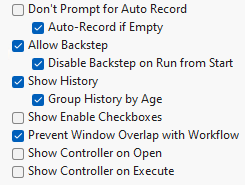
The Workflow Builder preferences enable you to not prompt for auto record, allow for backstep, group log history by age, and prevent other windows from overlapping the Workflow Builder window.
Figure 15.23 Workflow Builder Preferences
Preference | Description |
|---|---|
Don’t Prompt for Auto Record | Specifies whether to prompt for auto recording. This option is deselected by default. If this option is deselected, the Auto-Record if Empty option is selected. |
Allow Backstep | Specifies whether to enable the user to back up a step in the workflow. This option is selected by default. |
Disable Backstep on Run from Start | Specifies whether to allow workflow steps to be backed up when an entire workflow is executed from the beginning. Backing up steps can be memory intensive, especially when backing up across the entire workflow. Select this setting to improve performance. |
Show History | Specifies whether to show the JMP Log History Panel in the Workflow Builder window. This option is selected by default. |
Group History by Age | Specifies whether to group history based on time. This option is selected by default. |
Show Enable Checkboxes | Specifies whether to show check boxes on the workflow to enable steps in the workflow. This option is deselected by default. |
Prevent Window Overlap with Workflow | Specifies whether to prevent other windows from overlapping the Workflow Builder window. This option is selected by default. |
Show Controller on Open | Specifies whether to show the controller for workflow steps in a separate pop-up window when opening a workflow. This option is deselected by default. |
Show Controller on Execute | Select this option to ensure that the pop-up controller is showing anytime that the workflow starts running. This option is deselected by default. |