Publication date: 07/15/2025
Step 3: Request Additional JMP Output
Continue to use the same report window that you created in Step 2: Remove the Box Plot from a JMP Report.
1. Click the Profits ($M) red triangle and select Test Mean.
The Test Mean window appears.
2. Type 500 in the Specify Hypothesized Mean box.
3. Click OK.
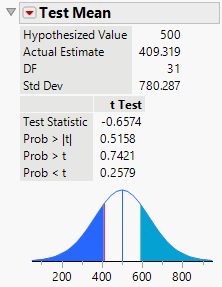
The test for the mean is added to the report window.
Figure 2.8 Test for the Mean
Want more information? Have questions? Get answers in the JMP User Community (community.jmp.com).