Style Preferences for JMP Graphs and Reports
The Styles page lets you customize colors, tick marks, grid lines, and report tables.
For more information about configuring the appearance of graphs, see Preferences for Data Tables.
Figure 15.4 Styles Preferences
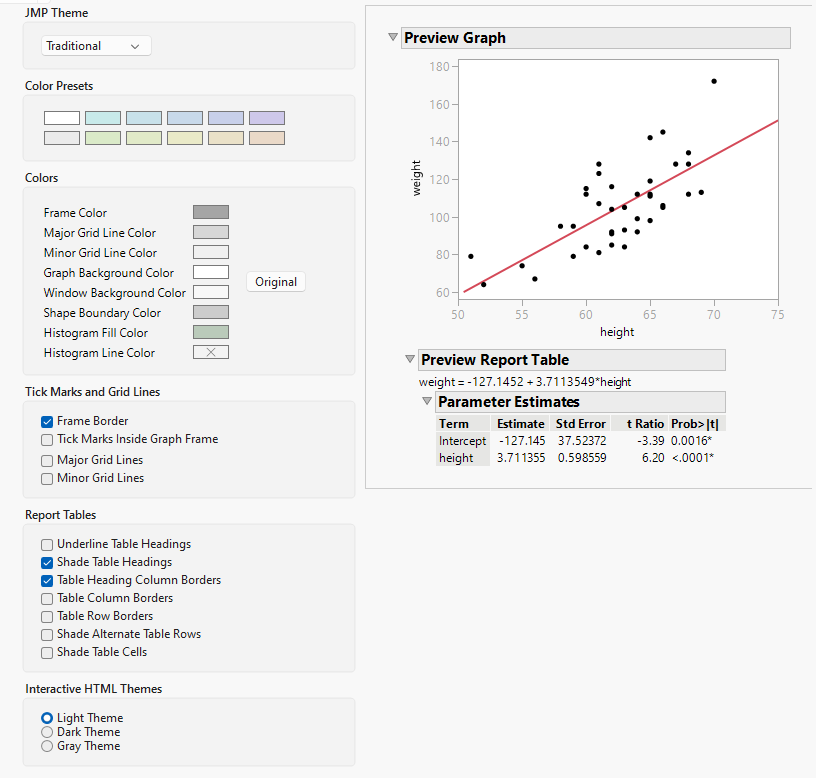
Preference | Description |
|---|---|
JMP Theme | Allows switching between four themes and change the appearance of JMP. Traditional The current default appearance of JMP. Comfortable Enhanced spacing for margins and padding of visual elements. JMP Live Aligned with the visual style of JMP Live. JMP Clinical Aligned with the visual style of JMP Clinical. |
Color Presets | Provides a set of predefined colors for use in customizing the appearance of reports, graphs, charts, and so on. Tints of the selected color are applied to the various elements. Note: The selected color is applied to windows also. |
Frame Color | Defines the color that is applied to a graph frame and tick marks. Click to change the default color. |
Major Grid Line Color | Defines the major grid line color. Click to change the default color. |
Minor Grid Line Color | Defines the minor grid line color. Click to change the default color. |
Graph Background Color | Click the color box to select a background color for all graphs. Click to change the default color. |
Window Background Color | Click the color box to select a background color for all reports and data tables. Click to change the default color. |
Shape Boundary Color | Click the color box to select the color for shape files boundaries. |
Histogram Fill Color | Defines the color to fill the histogram. Click to change the default color. |
Histogram Line Color | Defines the histogram line color. Click to change the default color. |
Original | Click to restore default color settings. |
Frame Border | Shows borders only on the axes. This option is selected by default. |
Tick Marks Inside Graph Frame | Shows axis tick marks inside the graph frame. This option is deselected by default. |
Major Grid Lines | Shows major grid lines on graphs. This option is deselected by default. |
Minor Grid Lines | Shows minor grid lines on graphs. This option is deselected by default. |
Underline Table Headings | Shows a border under table headers. This option is deselected by default. |
Shade Table Headings | Shows table headers with shading. This option is selected by default. |
Table Heading Column Borders | Shows divider lines between columns in table headers. This option is selected by default. |
Table Column Borders | Shows borders between table columns. This option is deselected by default. |
Table Row Borders | Shows borders between table rows. This option is deselected by default. |
Shade Alternate Table Rows | Shows alternate table rows with shading. This option is deselected by default. |
Shade Table Cells | Shows table cells with shading. This option is deselected by default. |
Interactive HTML Themes | Specifies the color theme for interactive HTML pages. The default theme is Light Theme. |