The Distribution Report
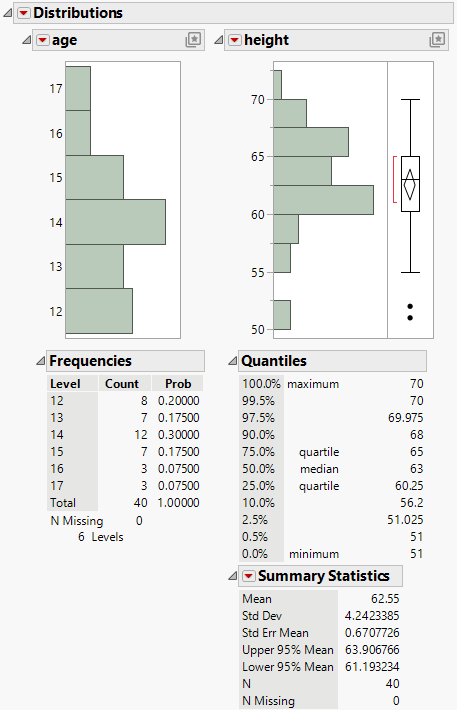
The initial Distribution report contains a histogram and reports for each variable. You can run additional analyses and tests using the red triangle menu options. See Distribution Platform Options.
This section contains information about the following sections of the Distribution report:
• The Summary Statistics Report
Figure 3.5 The Initial Distribution Report Window
Replace Variables Interactively
You can interactively add or replace variables in the Distribution report by selecting a variable in the Columns panel and dragging it onto the Distribution report.
Tip: If you press Ctrl and select a variable option, the option applies to all of the variables in the report that have the same modeling type.
Hidden and Excluded Rows
If you apply the Hidden row state to rows in the data table, the corresponding points do not appear in plots that show points. However, histograms are still constructed using the hidden rows.
If you want to exclude rows from the construction of the histograms and from analysis results, apply the Exclude row state. Then click the Distributions red triangle and select Redo > Redo Analysis. Any rows that are excluded in the data table are also hidden in plots that show points.