Transform Scoping
In Graph Builder, transform scoping enables you to control how a transform column corresponds to the platform context, such as the local data filter, so that the transform sees the same rows as the platform. The scoping can be applied only to transform columns that depend on multiple rows, such as those in the Aggregate, Distributional, and Rows groups of the transform menu.
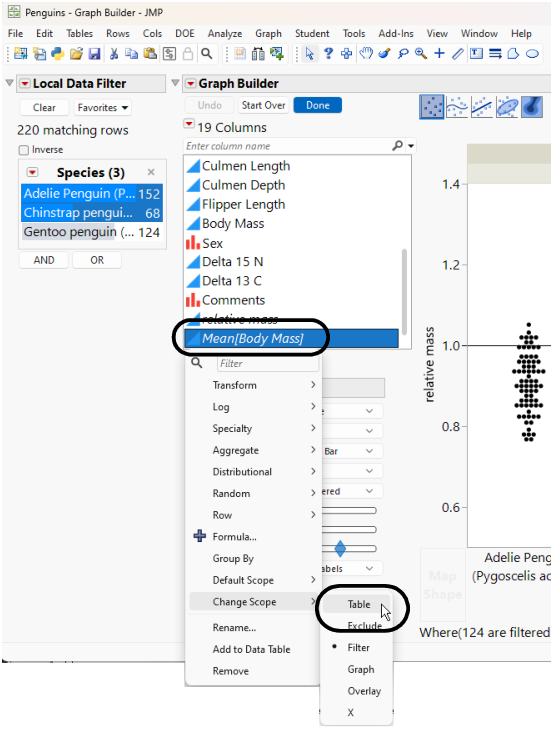
To apply a scope before making a transform column, right-click on a column name and select Default Scope. To apply a different scope to an existing transform column, select Change Scope.
The scope options:
Table
All rows
Exclude
All rows with the same Excluded row state
Filter
All rows with the same local data filter state (and Exclude). The default scope.
Graph
All rows with the same grouping values (and Filter and Exclude)
Overlay
All rows with the same overlay value (and Graph and Filter and Exclude)
X
All rows with the same X value (and Overlay and Graph and Filter and Exclude)
Scripting Transform Scope
The scopes other than Table correspond to implicit transform variables. These variables start with “@” and can be seen in the Formula Editor and in the saved platform script.
You can script Graph Builder using these “@” variables. For example, using the @X variable as part of the computation, or by skipping some scoping levels (such as using Graph and X without Overlay, which would normally be between them).
The following JSL script computes Body Mass divided by the average body mass, with a local data filter to show only two species:
Open( "$SAMPLE_DATA/Penguins.jmp" );
Graph Builder(
Transform Column( "relative mass", Formula( :Body Mass / :"Mean[Body Mass]"n ) ),
Transform Column(
"Mean[Body Mass]",
Formula( Col Mean( :Body Mass, :"@Exclude"n, :"@Filter"n ) )
),
Variables( X( :Species ), Y( :relative mass ), Group X( :Sex ) ),
Elements( Points( X, Y, Legend( 13 ) ) ),
Local Data Filter(
Add Filter(
columns( :Species ),
Where(
:Species == {"Adelie Penguin (Pygoscelis adeliae)",
"Chinstrap penguin (Pygoscelis antarctica)"}
),
Display( :Species, N Items( 3 ), "List Display" )
)
),
SendToReport(
Dispatch( {}, "relative mass", ScaleBox,
{Min( 0.5 ), Max( 1.4 ), Inc( 0.2 ),
Minor Ticks( 0 ), Add Ref Line( 1, "Solid", "Black", "", 1 )}
)
)
);
The resulting graph displays the average body mass of the rows that were not filtered out. To change the scope to use all rows from the table, right click the Mean[Body Mass] column and select Change Scope > Table.
Figure 4.45 Change Scope