Workflow Builder Reference Manager
Use the Reference Manager to control table and column references in your workflow. Use while building your workflow to control the dynamic replacement of table and column references. Use after running a workflow to save the replacement selections to the workflow code or to reset to the original references.
Figure 13.6 Workflow Builder Reference Manager
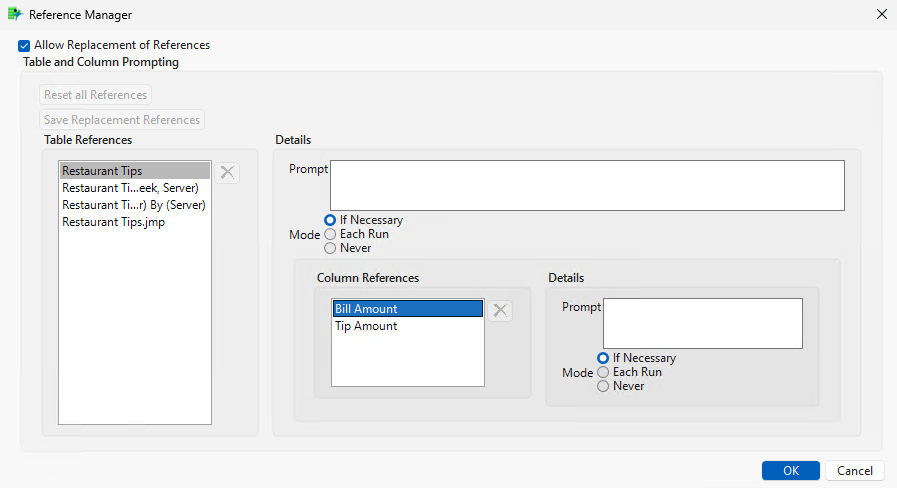
Allow Replacement of References
Enables or disables the dynamic replacement of references. This is equivalent to the Allow Replacement of References option in the red triangle. Leave this option selected to allow for prompting for tables or columns that are not found when the workflow runs. This enables you to use the workflow on different data tables with different column names.
Reset all References
(Available after a workflow with replacements runs.) Resets the table and column references in the step code to the original references.
Save Replacement References
(Available after a workflow with replacements runs.) Updates the table and column references in the step code to the table and columns that were selected during the workflow run.
Table References
Shows a list of tables that are available to set replacement options. Use the Details section to define the replacements.
Prompt
(Optional) Enables you to set a custom prompt for the table replacement window.
Mode
Defines the scenarios in which the workflow prompts for a replacement table.
If Necessary
If a referenced table is not found, the workflow prompts for a replacement table.
Each Run
The workflow prompts for the table on every run.
Never
The workflow does not prompt for the data table. If the data table is missing, any steps that need the data table are not run.
Column References
Shows a list of columns that are available for the selected table to set replacement options. Use the Details section to define the replacements.
Prompt
(Optional) Enables you to set a custom prompt for the column replacement window.
Mode
Defines the scenarios in which the workflow prompts for a replacement column.
If Necessary
If a referenced column is not found, the workflow prompts for a replacement column.
Each Run
The workflow prompts for the column on every run.
Never
The workflow does not prompt for the column. If the column is missing, any steps that need the column are not run.