Publication date: 01/13/2026
Draw Pies and Arcs
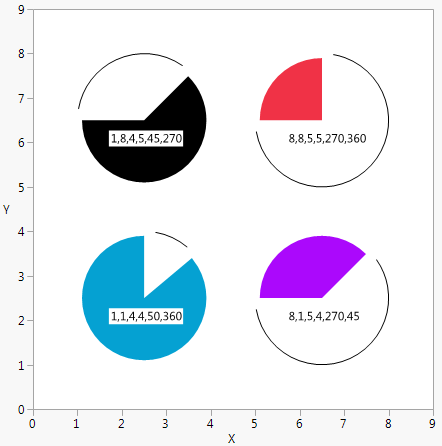
Pie() and Arc() draw wedges and arc segments in JMP graphs. The first four arguments define the rectangle in which the wedge or arc is drawn, wherex1, y1 are the top left of the rectangle, and x2, and y2, are the bottom right of the rectangle. The last two arguments are the starting and ending angles in degrees, where 0 degrees is 12 o'clock and 90 degrees is 3 o’clock. The arc or slice is drawn clockwise from start to finish.
win = New Window( "Pies and Arcs",
Graph Box(
Frame Size( 400, 400 ),
X Scale( 0, 9 ),
Y Scale( 0, 9 ),
Fill Color( "Black" ), // top left
Pie( 1.1, 7.9, 3.9, 5.1, 45, 270 ),
Text( Erased, {1.75, 6}, "1,8,4,5,45,270" ),
Arc( 1, 8, 4, 5, 280, 35 ),
Fill Color( "Red" ), // top right
Pie( 7.9, 7.9, 5.1, 5.1, 270, 360 ),
Text( Erased, {5.75, 6}, "8,8,5,5,270,360" ),
Arc( 8, 8, 5, 5, 370, 260 ),
Fill Color( "BlueCyan" ), // bottom left
Pie( 1.1, 1.1, 3.9, 3.9, 50, 360 ),
Text( Erased, {1.75, 2}, "1,1,4,4,50,360" ),
Arc( 1, 1, 4, 4, 370, 40 ),
Fill Color( "Purple" ), // bottom right
Pie( 7.9, 1.1, 5.1, 3.9, 270, 45 ),
Text( Erased, {5.75, 2}, "8,1,5,4,270,45" ),
Arc( 8, 1, 5, 4, 55, 260 )
)
);
Figure 12.14 Drawing Pies and Arcs
Want more information? Have questions? Get answers in the JMP User Community (community.jmp.com).