발행일 : 03/10/2025
Autocomplete Functions
If you do not remember the exact name of a JSL function, use autocompletion to see a list of functions that match what you have typed so far. In the script editor, type part of the name, and then press Ctrl+Space on Windows (Option+Esc on macOS).
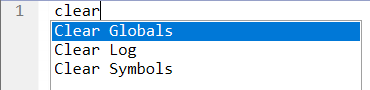
Suppose that you want to clear your JSL variables, but do not remember the command. You can type clear and then press Ctrl+Space, to see a list of possible clear commands. Select the command that you want to insert.
Figure 4.3 Autocomplete Example
더 많은 정보를 원하십니까? 질문이 있습니까? JMP 사용자 커뮤니티에서 답변 받기 (community.jmp.com).