Identical Findings
This report identifies tests from all findings domains that have the same result for a specified minimum number of results.
Report Results Description
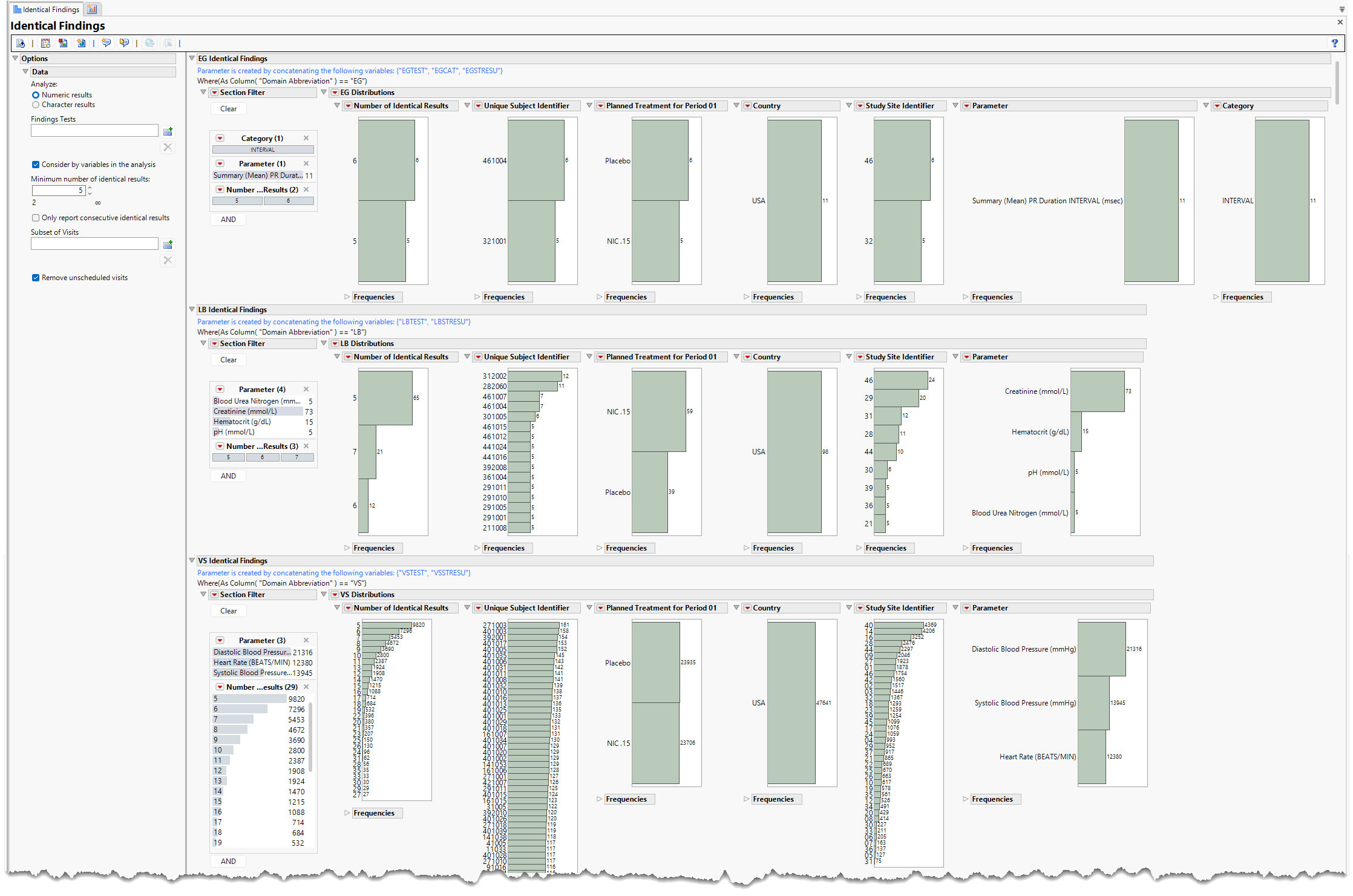
Running Identical Findings for Nicardipine for a minimum of 5 identical findings generates the report shown below (click image to enlarge).
Test Results
Multiple sections, one for each findings domain, are displayed. Summarized data include those test results that are identical five or more times throughout the course of the study.
Each section contains the following elements:
| • | One or more Histograms. |
The data table underlying these histograms represent test results that are identical for a minimum specified number of times or more. Number of Identical Results shows the number of identical results for each subject. Unique Subject Identifier identifies the subjects showing identical results. Treatment is provided to show whether the counts of identical tests vary based on treatment. Country summarizes the country where the study site was located. Study Site Identifier shows the counts of identical tests at each study site. Parameter shows the tests that are identical.
See Distribution for more information.
Click the  general button to show the records for selected subjects. This details the tests that are identical, as well as the value and the number of times each value is repeated.
| • | Section Filter |
These filters enable you to specify tests and the number of identical results. Refer to Data Filter for more information.
| • | Frequency Tables |
There is a table for each bar chart listing the counts and frequencies for observing identical findings.
Options
Data
Analyze:
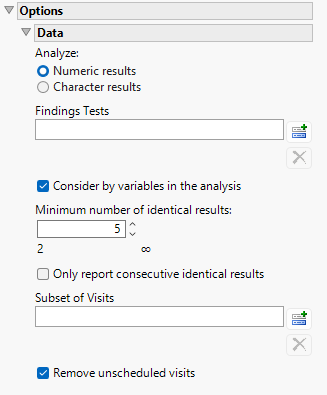
Use this widget to specify whether numeric or character results should be analyzed for duplicates. If the raw data has only numeric result variables (xxSTRESC/AVAL) and the user selects “Character results” for this option, the following message is surfaced: No character results are available or all results are blank. Numeric results are analyzed instead.
Findings Tests
Use this widget to select Findings Tests for the analysis. The report will autorun with the analysis restricted to the selected tests only.
Consider BY variables in the analysis
You can opt to Consider BY variables in the analysis. This option, which assumes that BY variables (left vs. right arm for collecting blood pressure data, for example) are included in the experimental design, is selected by default. You can uncheck this option to ignore BY variables.
Minimum Number of Identical Results
Use this widget to specify the minimum number of identical results a subject must have to be listed.
Only report consecutive identical results
Use this widget to specify whether the identical results must be consecutive. By default, this box is not checked.
Subset of Visits
Use the Subset of Visits option to select the visits to be included in the analysis.
Remove unscheduled visits
You might or might not want to include unscheduled visits when you are analyzing findings by visit. Check the Remove unscheduled visits to exclude unscheduled visits.
General and Drill Down Buttons
Action buttons provide you with an easy way to drill down into your data. The following action buttons are generated by this report:
| • | Click  to rerun the report using default settings. to rerun the report using default settings. |
| • | Click  to view the associated data tables. Refer to Show Tables for more information. to view the associated data tables. Refer to Show Tables for more information. |
| • | Click  to generate a standardized PDF- or RTF-formatted report that contains the plots and charts of selected sections. to generate a standardized PDF- or RTF-formatted report that contains the plots and charts of selected sections. |
| • | Click  to generate a JMP Live report. Refer to Create Live Report for more information. to generate a JMP Live report. Refer to Create Live Report for more information. |
| • | Click  to take notes and store them in a central location. Refer to Add Notes for more information. to take notes and store them in a central location. Refer to Add Notes for more information. |
| • | Click  to read user-generated notes. Refer to View Notes for more information. to read user-generated notes. Refer to View Notes for more information. |
| • | Select one or more subjects and then click  to apply the Review Subject Filter and filter all reports in the review builder on the selected subjects. to apply the Review Subject Filter and filter all reports in the review builder on the selected subjects. |
| • | Select a group of subjects and click  to specify Derived Population Flags that enable you to distinguish the selected group of subjects from the general population. to specify Derived Population Flags that enable you to distinguish the selected group of subjects from the general population. |
Default Settings
Refer to Set Study Preferences for default Subject Level settings.
Methodology
No testing is performed. Analysis is restricted to tabulating counts/frequencies of subjects exhibiting identical findings results.