
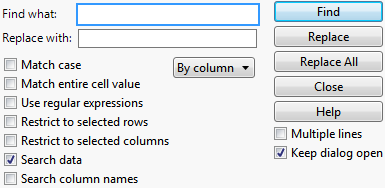
Figure 3.20 The Find Window
|
•
|
|
•
|
If your data table contains value labels, using the Search commands searches for actual values, but does not search for labels. See Value Labels in The Column Info Window.
|
Tip: To find missing character values, leave the Find what box empty and check Match entire cell value. To find missing numeric values, insert a period into the Find box and check Match entire cell value.
Assumes the find string to be a regular expression instead of the literal string that you enter in the Find what box. The regular expressions follow standard semantics.
Enter a value in the Replace with box and click Replace. Or, if the Search window is closed, select Edit > Search > Replace. If the replace value is a missing value, the currently highlighted cell content becomes a missing value.
Enter a value in the Replace with box and click Replace All. Or, if the Search window is closed, select Edit > Search > Replace All.
Enter a value in the Replace with box and click Replace. Or, if the Search window is closed, select Edit > Search > Replace and Find Next. Or, press CTRL-L.
To use a selected value as the Find what value
In the data table, select a value. Select Edit > Search > Use Selection for Find. Next, select Edit > Search > Find. The value that you selected in the data table is already entered in the Find what field.
To use a selected value as the Replace with value
In the data table, select a value. Select Edit > Search > Use Selection for Replace to populate the Replace with field.
Select Edit > Search > Find Next. Or, press CTRL-G, or F3 on Windows.
|
•
|
To find missing character values, leave the Find what field empty and select Match entire cell value.
|
|
•
|
To find missing numeric values, type a period into the Find what text box.
|