Configure Components
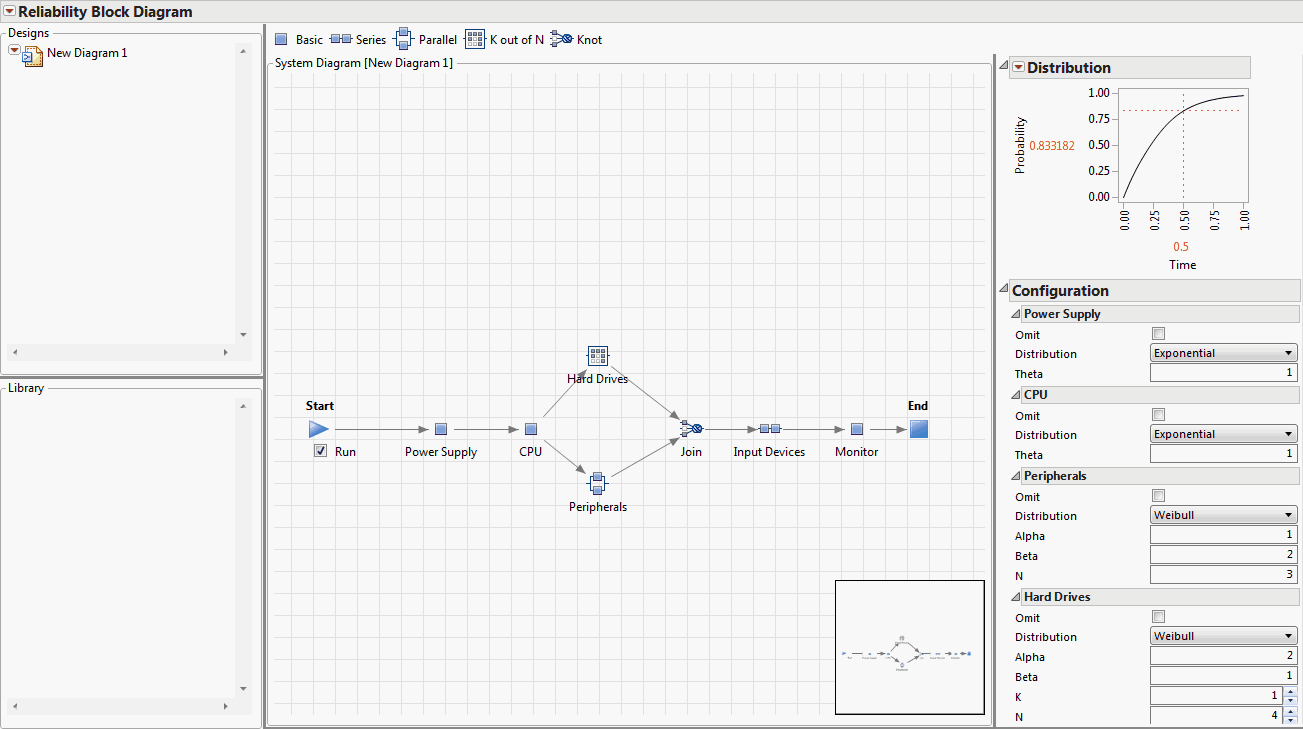
1. In the Configuration panel, enter the Configuration settings for the components. See Configuration Settings.
Component | Settings |
|---|---|
Power Supply | • Distribution—Exponential • Theta—1 |
CPU | • Distribution—Exponential • Theta—1 |
Peripherals | • Distribution—Weibull • Alpha—1 • Beta—2 • N—3 |
Hard Drives | • Distribution—Weibull • Alpha—2 • Beta—1 • K—1 • N—4 |
Join | Minimum available—1 |
Input Devices | • Distribution—Fréchet • Location—0 • Scale—1 • N—2 |
Monitor | • Distribution—Exponential • Theta—1 |
The Reliability Block Diagram is complete (Figure 11.11).
2. Select Run.
The system’s reliability information is updated. This is reflected in the Distribution plot in the Profiler pane.
3. To save the Reliability Block Diagram as a JMP Scripting Language (JSL) file, select File > Save and name it exampleRBDcomplete.jsl.
Figure 11.11 Example Reliability Block Diagram