Add Text to Hover Labels in JMP Graphs
A textlet is a hover label extension that adds formatted text to a hover label in a JMP graph. You might use a textlet to describe data in an explanatory paragraph or to call out important information by making the text bold or drawing the text in a different color.
Example of Adding Text to a Hover Label
Create the Original Graph
1. Select Help > Sample Data Folder and open Diabetes.jmp.
These data show measurements for diabetes patients that track the progression of the disease.
2. Select Graph > Graph Builder.
3. Select LDL and drag it to the Y zone.
4. Select Age and drag it to the X zone.
5. Click the Line of Fit element ( ).
).
6. Click Done.
7. Hover over the point in row 345.
Figure 9.69 Initial Hover Label for Content for Row 345
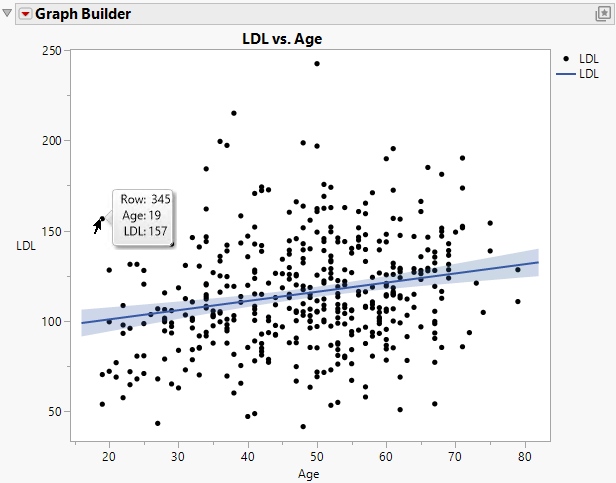
For the data point in row 345, you see the row number, age of the person, and the person’s LDL measurement. Change what appears in the hover labels:
• Add the patient’s level of disease progression in a sentence.
• Assign different colors to the levels of the disease progressions, based on severity.
Add Text
1. Put your cursor over the hover label for row 345 and click the Pin element ( ).
).
Pinning the hover label lets you see your changes as you apply them.
2. Right-click in the graph and click Hover Label > Hover Label Editor.
3. Click Textlet.
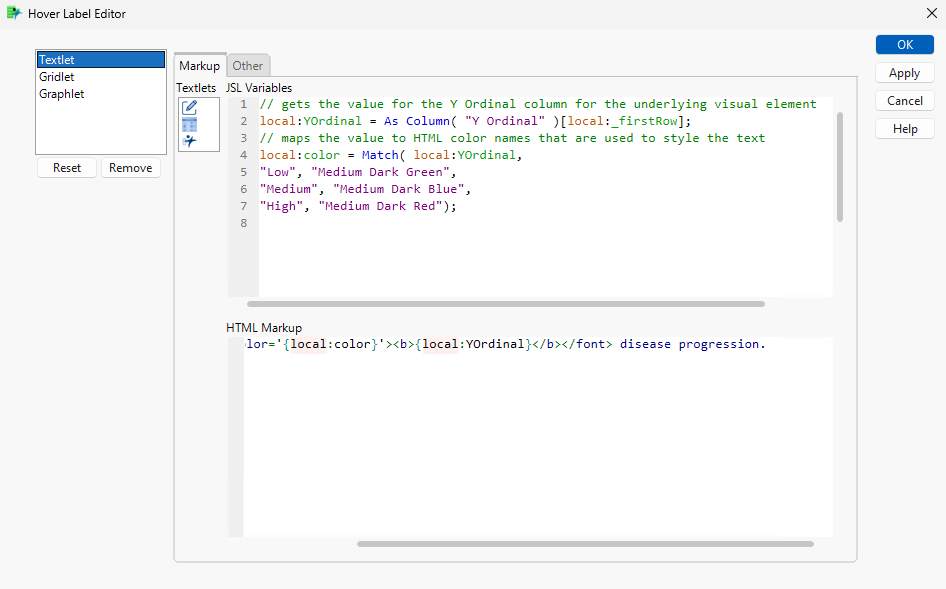
4. In the JSL Variables box, define the variables by using JSL.
Copy and paste the following JSL script:
// gets the value for the Y Ordinal column for the underlying visual element
local:YOrdinal = As Column( "Y Ordinal" )[local:_firstRow];
// maps the value to HTML color names that are used to style the text
local:color = Match( local:YOrdinal,
"Low", "Medium Dark Green",
"Medium", "Medium Dark Blue",
"High", "Medium Dark Red");
5. Under HTML Markup, write your text by using HTML and the JSL variables that you just defined.
Copy and paste the following code:
Patient has <font color='{local:color}'><b>{local:YOrdinal}</b></font> disease progression.Figure 9.70 JSL Variables and HTML Markup for Textlet
6. Click OK.
Figure 9.71 Updated Hover Label That Contains Rich Text
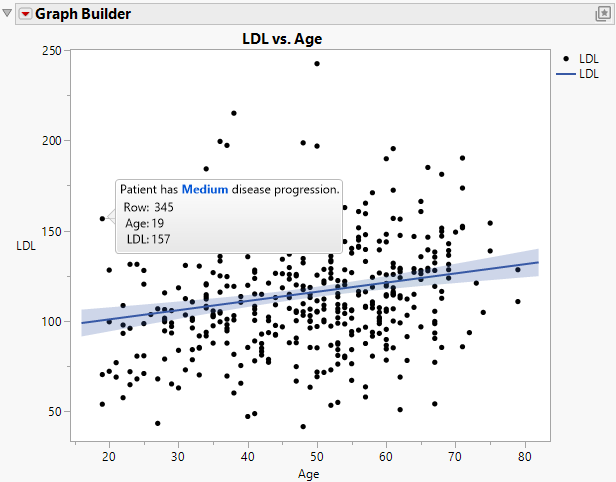
The new sentence that indicates the level of disease progression appears in the hover label. Because the disease progression for this patient is medium, it is color coded blue.