Publication date: 07/15/2025
Customize Hover Labels in JMP Graphs
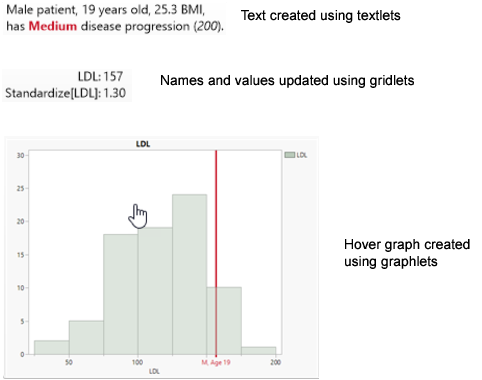
When you hover over a visual element in a JMP graph, you usually see a basic description of the data point in a hover label. Customize what appears in the hover label in any of these ways:
|
Add interactive graphs or images with graphlets. |
|
|
Add formatted text with textlets. |
|
|
Add, remove, or update names and values by using gridlets. |
|
|
Learn more about using the Hover Label Editor. |
|
|
Add images from data tables. |
|
|
Pin hover labels on graphs. |
|
|
Format hover labels and access additional options. |
Figure 9.54 Examples of Graphs, Text, Names, and Values in Hover Labels
Want more information? Have questions? Get answers in the JMP User Community (community.jmp.com).