Common Options in the Import from AspenTech IP.21 Server Wizard
Figure 3.60 Import from AspenTech IP.21 Server Window
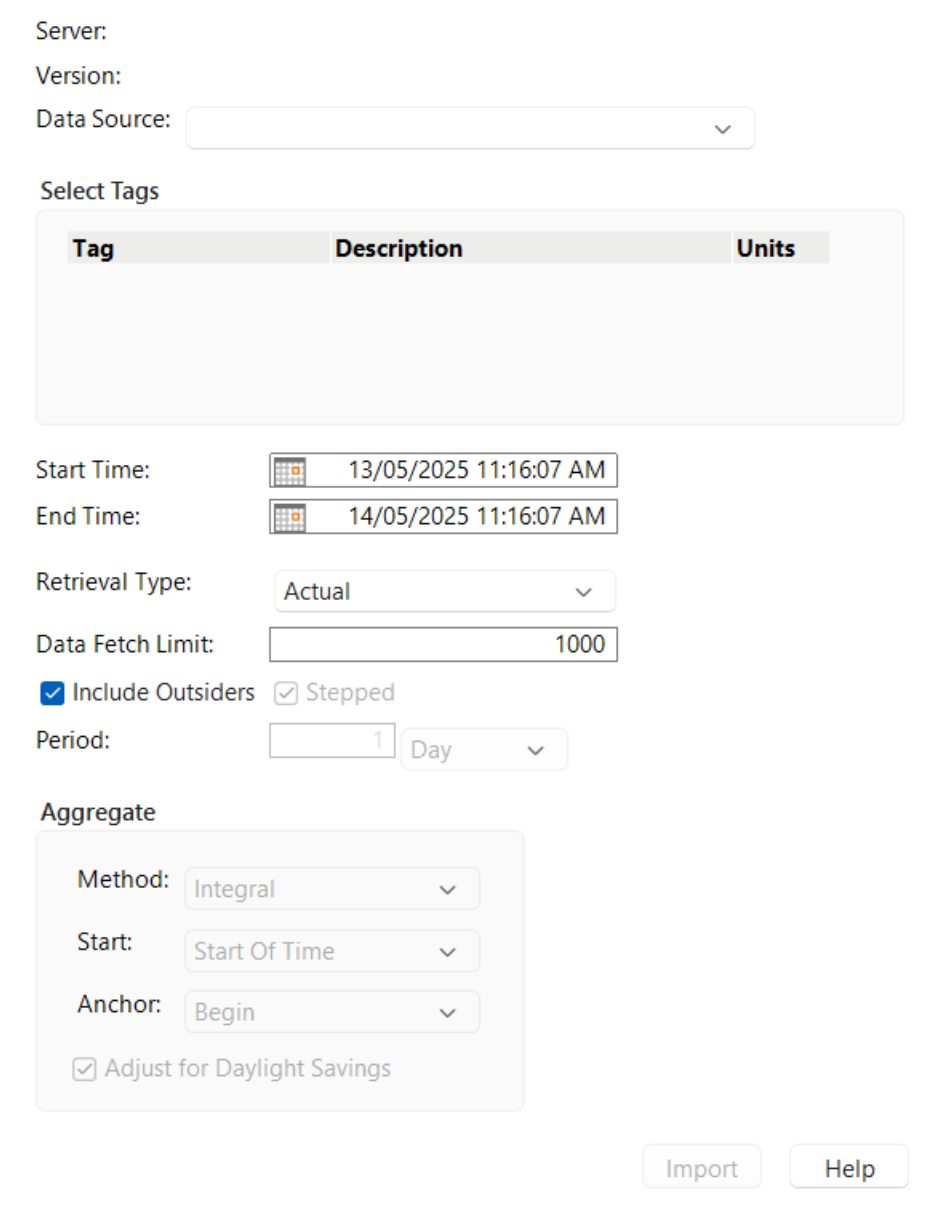
Select and specify the following information, in the order in which it is listed:
Data Source
Specifies from the available data sources on the server.
Start Time
Specifies the beginning of the time period for the data that you want.
Note: Start Time and End Time values are specified in the format MM:DD:YYYY HH:MM:SS.
End Time
Specifies the end of the time period for the data that you want.
Retrieval Type
Specifies how the server processes or filters the data before sending it to a data table. The created data table will be populated with a table variable with the name “Retrieval Type” and whose value is the type specified in the import wizard.
Actual
This option is specified by default. Retrieves all of the raw data for the time period specified.
Interpolated
Retrieves estimated data points at evenly spaced intervals over the specified time period.
Best Fit
Retrieves a simplified data set that best represents the trend of the original data within the selected time period.
Manual
Retrieves only the data points that were manually entered or adjusted by a user.
Not Good
Retrieves data points that are null, zero, or otherwise considered invalid.
Good
Retrieves all data points that are valid, non-null, and nonzero.
Average
Retrieves the average value of the data over the specified time period.
Maximum
Retrieves the highest recorded value within the specified time period.
Minimum
Retrieves the lowest recorded value within the specified time period.
Range
Retrieves the difference between the maximum and minimum values for the selected time period.
Sum
Retrieves the total of all values for the specified time range.
Std Dev
Retrieves the standard deviation, showing how much the values deviate from the average.
Variance
Retrieves the variance, indicating the spread or variability of the data over time.
Good Only
Retrieves only data points explicitly marked as valid and excludes any null or zero values.
Suspect Only
Retrieves only data points flagged as potentially invalid, including nulls, zeros, or out-of-range values.
First
Retrieves the first recorded value in the specified time period.
Last
Retrieves the last recorded value in the specified time period.
Data Fetch Limit
Specifies the maximum number of data points to retrieve in a single query.
Include Outsiders
Includes data points that fall slightly outside the requested time range to ensure boundary coverage.
Stepped
Specifies the amount of time to skip between values when interpolating. Steps can be specified in days, hours, minutes, or seconds.
Period
Defines the frequency at which data points are retrieved or calculated.
Aggregate Options
The following options are available for retrieval types that perform a statistical or quality analysis on the data, such as Good, Average, and First.
Method
Integral
This option is specified by default. Calculates the time-weighted integral of the data over the specified period.
Value
Uses the raw or processed value at the defined anchor point within each period.
Integral Incomplete
Calculated the integral only if the period contains enough valid data.
Value Incomplete
Uses the value only if sufficient data is available. Skips periods with missing or invalid data.
Start
Start of Day
Anchors the analysis or aggregation to the beginning of each calendar day.
Start of Time
This option is specified by default. Anchors the analysis to the beginning of the full requested time range.
Anchor
Begin
This option is specified by default. Anchors the calculation or value selection to the start of each time period.
Middle
Anchors the calculation or value selection to the midpoint of each time period.
End
Anchors the calculation or value selection to the end of each time period.
Adjust for Daylight Savings
This option is selected by default. Applies Daylight Saving Time adjustments to align aggregated data with local time conventions.