Example of Backward Selection
This example illustrates backward selection in the Stepwise personality of the Fit Model platform. In backward selection, all terms are entered into the model and then the least significant terms are removed until all of the remaining terms are significant. Consider the fitness data that is described in Example Using Stepwise Regression.
1. Select Help > Sample Data Folder and open Fitness.jmp.
2. Select Analyze > Fit Model.
3. Select Oxy and click Y.
4. Select Weight, Runtime, RunPulse, RstPulse, MaxPulse, and click Add.
5. For Personality, select Stepwise.
6. Click Run.
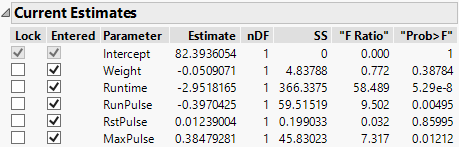
7. Click Enter All.
Figure 5.28 All Effects Entered into the Model
8. For Direction, select Backward.
9. Click Step two times.
The first backward step removes RstPulse, and the second backward step removes Weight.
Figure 5.29 Current Estimates with Terms Removed and Step History Table
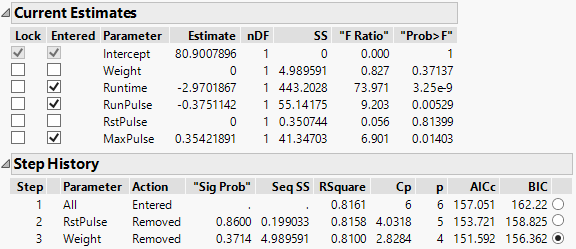
The Current Estimates and Step History tables summarize the backward stepwise selection process. Note the BIC value of 156.362 for the third step in the Step History table. If you click Step again to remove another parameter from the model, the BIC value increases to 159.984. For this reason, you choose the step 3 model. This is also the model that is fit when you use the Go button to automatically run the backward selection.