Example of Forward Selection
This example illustrates forward selection in the Stepwise personality of the Fit Model platform. In forward selection, terms are entered into the model starting with the most significant term and continuing until all significant terms have been added. Consider the fitness data that is described in Example Using Stepwise Regression.
1. Select Help > Sample Data Folder and open Fitness.jmp.
2. Select Analyze > Fit Model.
3. Select Oxy and click Y.
4. Select Weight, Runtime, RunPulse, RstPulse, MaxPulse, and click Add.
5. For Personality, select Stepwise.
6. Click Run.
Notice that the default selection for Direction is Forward.
7. Click Step.
Figure 5.26 Current Estimates Table for Forward Selection after One Step
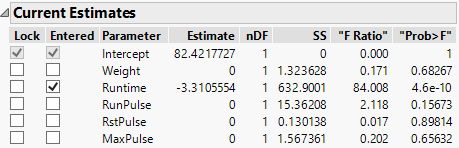
Notice that after one step, the most significant term, Runtime, is entered into the model.
8. Click Go.
Figure 5.27 Current Estimates Table for Forward Selection after Three Steps
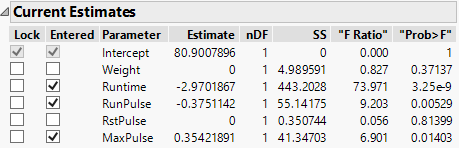
Notice that three of the five terms have been added to the model.