Example of Marker Statistics
Learn how to calculate marker statistics from your genetic data.
1. Select Help > Sample Data Folder, open Life Sciences, and then open Genotypes Pedigree.jmp.
2. Select Analyze > Life Sciences > Marker Statistics.
3. Click the Markers disclosure icon to show the Marker columns.
4. Select the first ten marker columns and click Marker.
5. Click OK.
Figure 3.2 The Marker Statistics Report
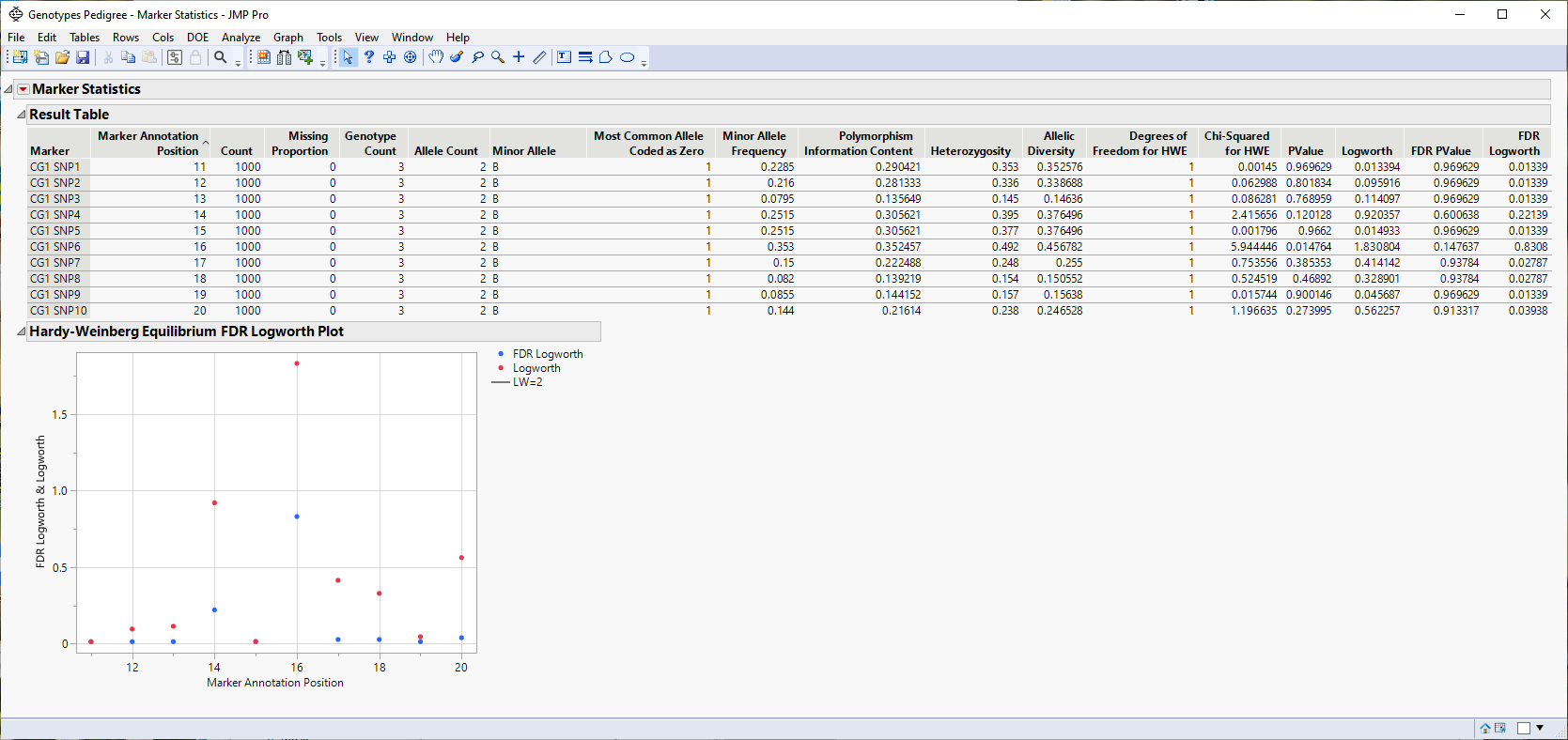
The Result Table provides statistics for each of the markers that are analyzed. See Result Table.
The Hardy-Weinberg Equilibrium plot shows how close each of the markers are to equilibrium. The column number of each marker in the JMP table is plotted on the x-axis. The Logworth-adjusted p-value and -log10 (p-value) for HWE for each marker is plotted on the y-axis. Markers at or below the reference line are at equilibrium; markers above the line are not. The farther from the reference a marker is, the further the marker is from equilibrium.
Note: To see the Levels and Counts tables, click the Marker Statistics red triangle and select the corresponding option.