Example of Multigroup Measurement Invariance
You can use the Structural Equation Models platform to perform factorial invariance tests, which enable you to specify and assess models for comparing mean and variance differences in latent variables across groups and time. In this example, you are testing measurement invariance across groups using Configural, Weak, Strong, and Strict invariance models. This analysis examines how well the latent variable DEI (students’ perceptions of Diversity, Equity, and Inclusion at school) is represented by the observed variables Promotion, Cultural, and Critical across gender groups (Girl and Boy).
1. Select Help > Sample Data Folder and open Secondary Students.jmp.
2. Select Analyze > Multivariate Methods > Structural Equation Models.
3. Select Promotion, Cultural, and Critical and click Model Variables.
4. Select Gender and click Groups.
5. Click OK.
6. Click the Model Shortcuts red triangle and select Cross-Sectional Classics > Multigroup Measurement Invariance.
7. In the Confirm Choices for Model Specification window, select Promotion, Cultural, and Critical from the list of indicators, type DEI in the text box, and click the add latent variable  button.
Note: By default, all four models are fitted and compared. You can specify particular models by deselecting the check box next to the Fit and compare all models option, and then selecting the desired models individually. This flexibility is particularly helpful when partial invariance is required, because it enables you to test specific models that might fit the data better by relaxing certain constraints imposed by other models.
8. Click OK.
The report that appears includes Model Comparison and Chi-Square Difference Test reports, along with individual Structural Equation Model reports for each specified model. The Structural Equation Model reports are presented in separate tabs for each group.
Figure 8.29 Model Comparison and Chi-Square Difference Test Reports
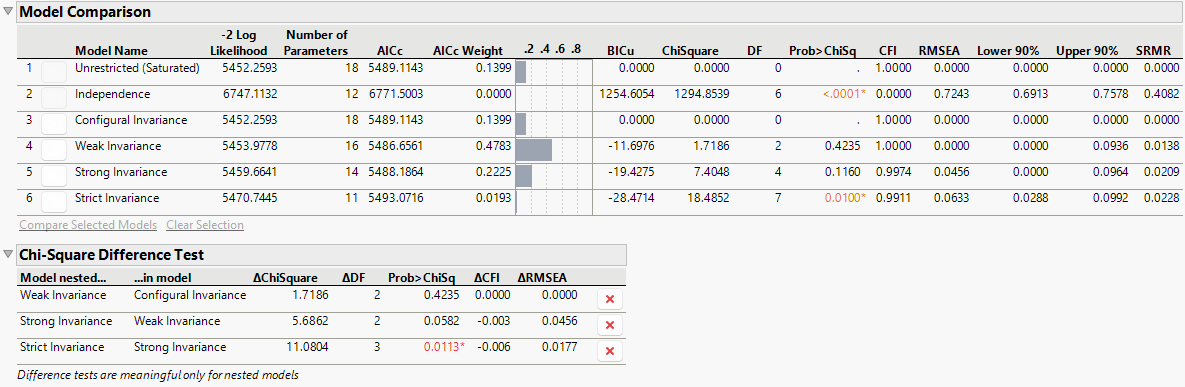
The Model Comparison and Chi-Square Difference Test reports enable you to assess model fit across the different levels of measurement invariance. Among the tested models, the Strong Invariance model has the most evidence of best fit. This model constrains both factor loadings and intercepts to be equal across groups, which provides meaningful comparisons of latent means across genders. The CFI (0.9974) and RMSEA (0.0456) values for this model indicate an acceptable model fit. Moreover, despite the large sample size, the Chi-Square Difference Test report indicates that there is no significant difference between the Strong Invariance model and the less restrictive Weak Invariance model. This suggests that the Strong Invariance model fits the data well without sacrificing model fit. Although the Strict Invariance model (which also constrains residual variances to be equal across groups) was tested, this level of invariance is generally not necessary for meaningful cross-group comparisons of latent means. The significant drop in model fit from the Strong Invariance model to the Strict Invariance model suggests that equal residual variances across groups might be too restrictive and unnecessary. Therefore, you choose to use the Strong Invariance model as the final model, which is sufficient for comparing latent means across groups.
9. Click the  button next to the Configural Invariance, Weak Invariance, and Strict Invariance model names in the Model Comparison report.
This hides the corresponding Structural Equation Model reports for each of the non-chosen models.
10. Press Alt and click the red triangle next to Structural Equation Model: Strong Invariance.
Tip: The Alt key enables you to make multiple red triangle menu selections simultaneously.
11. Deselect Show Path Diagram, Summary of Fit, and Parameter Estimates.
12. Select Standardized Parameter Estimates.
This applies your selection to both the Girl and Boy tab reports.
Note: The Standardized Parameter Estimates option reports estimates on a correlation scale, which makes it easier to interpret the relationships between the latent variable and its indicators. This is particularly helpful for assessing the strength of these relationships. Typically, standardized loadings with an absolute value of 0.40 or higher are seen as strong indicators of a latent variable. This measure should be applied thoughtfully within the context of your specific model.
13. Click OK.
14. Right-click on either the Girl or Boy tab and select Set Style > Horizontal Spread.
Figure 8.30 Standardized Parameter Estimates for the Girl and Boy Groups
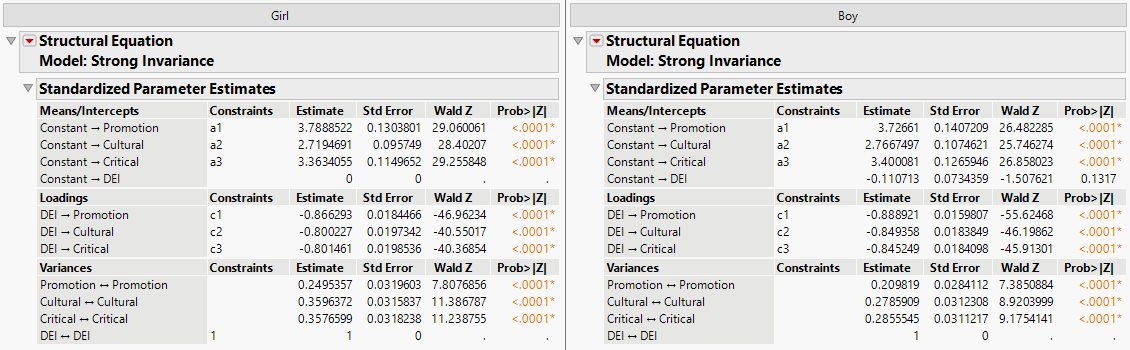
Figure 8.30 shows the standardized parameter estimates for the Strong Invariance model for the Girl and Boy groups, respectively. These estimates provide insight into the relationships between the latent variable DEI and the observed variables for both gender groups. Since strong invariance is assumed, the unstandardized factor loadings are constrained to be equal across groups, with small variations in the standardized estimates due to group-specific scaling. The reports show that the loadings for DEI on Promotion, Cultural, and Critical are statistically significant for both boys and girls (p-value < 0.0001 across all loadings). Although the loadings appear slightly stronger for boys than girls, these differences are due to group-specific scaling rather than actual structural differences, as the strong invariance assumption constrains these relationships to be the same across groups.
Overall, the Strong Invariance model confirms that DEI has the same conceptualization and is consistently measured across both boys and girls. Although there are minor differences in standardized estimates, they do not affect the overall structure or interpretation of the latent variable relationships. This model supports the robustness of the DEI construct across genders while highlighting subtle differences in how DEI explains variance in specific indicators.