Formulas in JMP
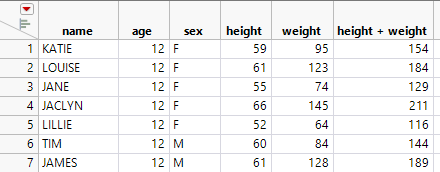
In spreadsheets, formulas apply to a single cell and can use data from any cell in the spreadsheet, including cells on different tabs of the workbook. In JMP data tables, formulas apply to an entire column. A formula can use data from any other column in the data table. Each row in the column has the same calculation applied to it. For example, consider a data table with a simple sum, as shown in Figure 2.11. The column height + weight has a formula. The formula adds the height and weight by row for all rows in the data table.
Figure 2.11 Data Table with Formula Column
For more information about JMP formulas, see “Create Formulas in JMP” in Using JMP.
Tip: For basic column summary statistics, use the Distribution platform. See “Distributions” inBasic Analysis.