Launch the Recurrence Analysis Platform
Launch the Recurrence Analysis platform by selecting Analyze > Reliability and Survival > Recurrence Analysis.
Figure 11.4 Recurrence Analysis Launch Window
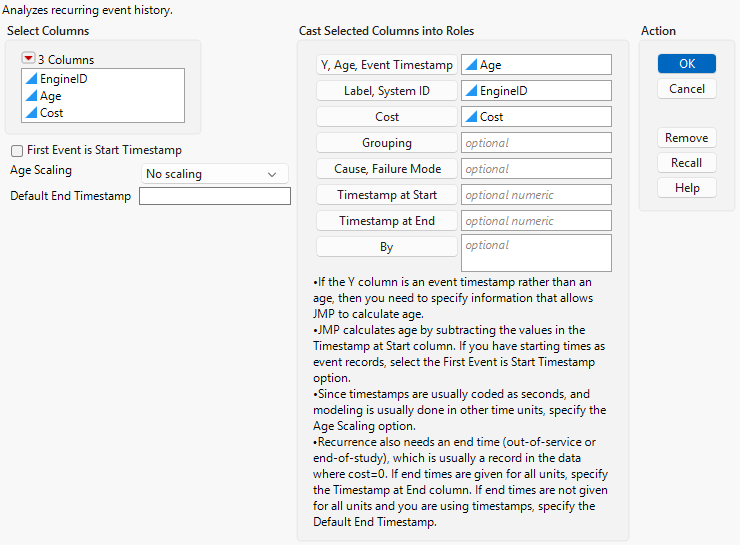
For more information about the options in the Select Columns red triangle menu, see “Column Filter Menu” in Using JMP.
Y, Age, Event Timestamp
Specifies either the unit's age at the time of an event or the timestamp of the event. If the Y column is an event timestamp, then the Timestamp at Start and Timestamp at End roles are required so that the platform can calculate the age of each event.
Label, System ID
Identifies the unit for each event and censoring age.
Cost
Identifies a column that must contain one of the following values:
– A 1, indicating that an event has occurred (a unit failed or was repaired, replaced, or adjusted). When indicators (1s) are specified, the MCF is the mean cumulative count of events per unit as a function of age.
– A cost for the event (the cost of the repair, replacement, or adjustment). When costs are specified, the MCF is a mean cumulative cost per unit as a function of age and the markers in the Event Plot are sized by the cost values.
– A zero, which indicates that the unit went out-of-service or that follow-up has ended. All units (each System ID) must have one row with a zero for this column, with the Y, Age, Event Timestamp column containing the final observed age. If each unit does not have exactly one last observed age in the table (where the Cost column cell is zero), then an error message appears.
Note: Cost indicators for Recurrence Analysis are the reverse of censor indicators seen in Life Distribution or Survival Analysis. For the cost variable, the value of 1 indicates an event, such as repair; the value of 0 indicates that the unit is no longer in service. For the censor variable, the value of 1 indicates censored values, and the value of 0 indicates the event or failure of the unit (uncensored value).
Grouping
Specifies a grouping variable. Separate MCF estimates are produced for the different groups that are identified by this column.
Cause, Failure Mode
Specifies a column that contains multiple failure modes or causes. If you specify a column for this role, the report contains a separate mean cumulative function (MCF) for each combination of Cause, Failure Mode column levels with Grouping column levels. In this case, the Cause, Failure Mode column contains a missing value to indicate when the unit went out-of-service, is no longer being studied, or follow-up has ended.
Timestamp at Start
Specifies the column with the origin timestamp. If you have starting times as event records, select the First Event is Start Timestamp option instead. JMP calculates age by subtracting the values in this column.
Timestamp at End
Specifies the column with the end-of-service timestamp. If end times are given for all units, specify that column here. If end times are not given for all units, specify the Default End Timestamp option instead. But if you have a record in which Cost is equal to zero, JMP uses that record as the end timestamp and you do not need to specify this role.
By
Specifies a column that creates a report that consists of separate analyses for each level of the variable. If more than one By variable is assigned, a separate analysis is produced for each possible combination of the levels of the By variables.
Age Scaling
Specifies the time units for modeling. For example, if your timestamps are coded in seconds, you can change them to hours.
Data Format
Recurrent event data involve the cumulative frequency or cost of repairs as units age. The data for recurrence analysis have one row for each observed event and a closing row with the last observed age of a unit. Any number of units or systems can be included. In addition, these units or systems can include any number of recurrences.