Launch the Response Screening Platform
Launch the Response Screening platform by selecting Analyze > Screening > Response Screening.
Figure 25.4 Response Screening Launch Window
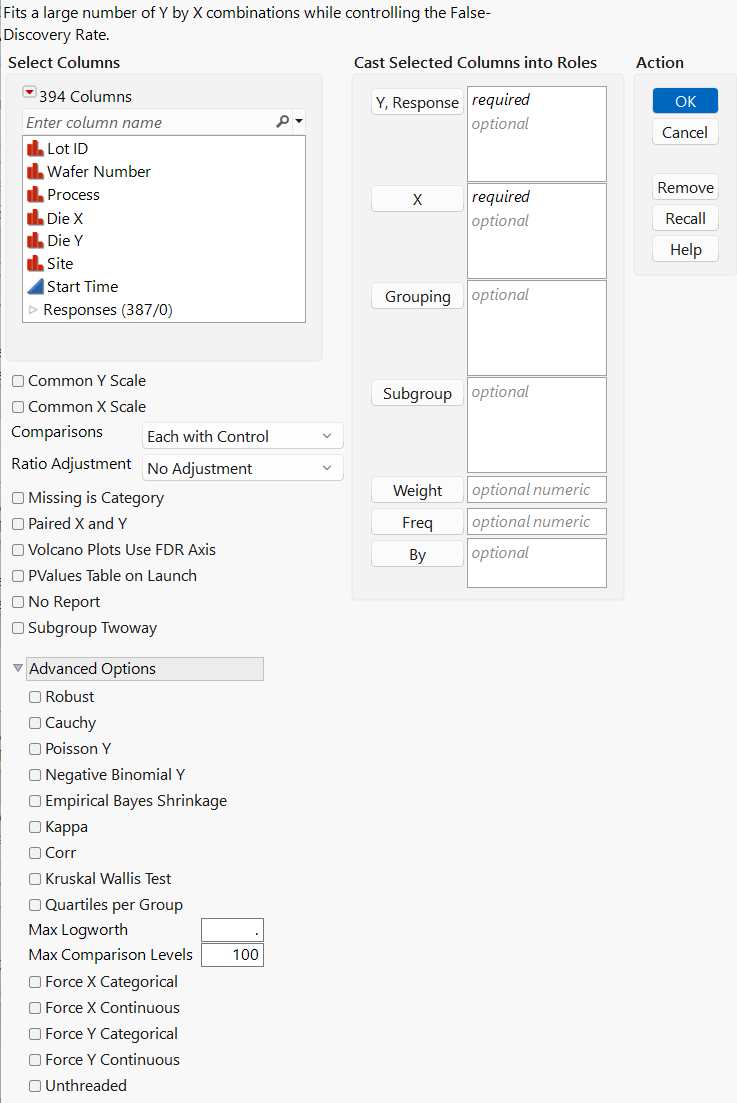
For more information about the options in the Select Columns red triangle menu, see “Column Filter Menu” in Using JMP.
Launch Window Roles
Y, Response
Specifies the response columns that contain the measurements to be analyzed.
X
Specifies the factor columns against which you want to test the responses.
Grouping
Specifies categorical columns as grouping variables. The rows assigned to each level of the specified column are analyzed separately. All results are presented in a single table and report.
Subgroup
Specifies one or more subgroup variables. First, an analysis is performed for all rows. Then, separate analyses are performed for each level of each subgroup variable. All results are presented in a single table and report.
Note: For a Grouping variable, each row contributes into only one group. For a Subgroup variable, each row can contribute into many different subgroups.
Weight
Specifies a column whose values assign a weight to each row. These values are used as weights in the analysis. See “Weight” in Fitting Linear Models.
Freq
Specifies a column whose values assign a frequency to each row. These values enable you to account for pre-summarized data. See “Frequency” in Fitting Linear Models.
By
Produces a separate report for each level of the By variable. If more than one By variable is assigned, a separate report is produced for each possible combination of the levels of the By variables.
Launch Window Options
Common Y Scale
(Applies only when there is more than one continuous response.) Notifies the platform that all of the continuous responses are on the same scale. This is necessary to compare mean differences or slopes. If this option is selected and there is at least one categorical X variable, the Logworth by Difference plot and the Means Differences report are shown by default in the Response Screening report window. If not selected, the Logworth by Difference plot is accessible through the Response Screening red triangle menu.
Common X Scale
(Applies only when there is more than one continuous X variable.) Notifies the platform that all of the continuous X variables are on the same scale. This is necessary to compare the slopes of different X variables. If both the Common X Scale and Common Y Scale options are selected, the Logworth by Slope plot is shown by default in the Response Screening report window and a Slope column is included in the Result Table. If not selected, the Logworth by Slope plot is accessible through the Response Screening red triangle menu.
Comparisons
Specifies how the means or rates of different levels of an X variable are compared.
Each with Control
For each categorical X variable, compares each level with a control group level. The default control group level is the first level.
Tip: You can add a Control Level column property to the factor column to specify a control group that is different from the default control group. See “Control Level” in Using JMP.
All Combinations
For each categorical X variable, compares all possible level combinations.
Ratio Adjustment
Provides options to add 0.5 to cell counts when calculating risk ratios, odds ratios, and risk differences. This adjustment avoids problems that arise from dividing by zero, if any of the cell counts are zero. See Haldane (1956). Use the ratio adjustment options if you have at least one nominal response and at least one categorical predictor.
No Adjustment
No adjustment is made to the cell counts.
Add 0.5 when any zero
Adds 0.5 to cells that have a count of zero when calculating the risk ratio, odds ratio, and risk difference.
Add 0.5 always
Adds 0.5 to all cell counts when calculating the risk ratio, odds ratio, and risk difference.
Missing is Category
For any categorical X variable, treats missing values on X as a category.
Paired X and Y
Performs tests only for Y columns paired with X columns according to their order in the Y, Response and X lists. The first Y is paired with the first X, the second Y with the second X, and so on.
Note: The following features are not supported if the Paired X and Y option is selected: Show Means Differences, Practical Differences and Equivalences, Show Slopes, and 2-by-M reports.
Volcano Plots Use FDR Axis
Specifies the FDR logworth as the vertical axis for the Logworth by Difference and Logworth by Slope plots.
PValues Table on Launch
Creates a data table for the p-values and individual model fit statistics. This data table is linked to the Result Table in the Response Screening report.
No Report
Suppresses the report window. Use this option to run Save commands to obtain results without the report window appearing.
Subgroup Twoway
(Available only when at least one Subgroup variable is specified.) Performs an analysis for each two-way subgroup combination.
Advanced Options
Robust
(Robust results shown only for continuous responses.) Fits regression and ANOVA models using the Huber M-estimation method (Huber and Ronchetti 2009). This method estimates parameters by minimizing the Huber loss function. The Huber loss function penalizes outliers, which reduces the influence of the outliers on tests. If there are no outliers, the estimates are close to the least squares estimates. When you select the Robust option, several Robust measures and model fit statistics columns are added to the Result Table. See “Statistical Details for the Robust Options” in Basic Analysis for more information about Huber M-estimation. For an example, see Example of Robust Fit.
Caution: The Robust option can increase processing time.
Cauchy
(Cauchy results shown only for continuous responses.) Estimates parameters using maximum likelihood and a Cauchy link function. This estimation method assumes that the errors have a Cauchy distribution, which has fatter tails than the normal distribution, resulting in a reduced emphasis on outliers. This option can be useful if you have a large proportion of outliers in your data. However, if your data are close to normal with only a few outliers, this option can lead to incorrect inferences. When you select the Cauchy option, several Cauchy measures and model fit statistics columns are added to the Result Table.
Poisson Y
Fits each response as a count variable that has a Poisson distribution. This option is appropriate when your responses are counts.
Negative Binomial Y
Fits each response as a count variable that has a negative binomial distribution. This option is appropriate when your responses are counts.
Empirical Bayes Shrinkage
(Available only if the Common Y Scale option is selected.) Shrinks residual variance estimates toward an estimated prior mode, borrowing strength across all estimates. This is useful when screening many continuous responses that are on a common scale. By applying the prior, there is an increase in the degrees of freedom and sum of squares error for each individual fit. This leads to a slight increase in power for the tests. See Smyth (2004).
Kappa
(Available only if Y and X are both categorical and have the same number of levels.) Calculates Kappa, a measure of agreement between Y and X. Results are reported in a column called Kappa in the Result Table.
Corr
Calculates the Pearson product-moment correlation. Results are reported in a column called Corr in the Result Table. For categorical variables, the correlation is calculated in terms of the indices defined by the value ordering.
If X and Y are both binary, the Pearson product-moment calculation gives Spearman’s Rho and Kendall's Tau-b. Otherwise, a value of Corr that is large in magnitude indicates an association; a Corr value that is small in magnitude does not preclude an association.
Kruskal Wallis Test
(Available only when there is at least one continuous response and at least one categorical X variable.) Calculates the Kruskal-Wallis chi-square test statistic. This is a nonparametric test for location that is based on the simple ranks of the data. The results for each combination of variables are shown in the Kruskal-Wallis Tests table. For more information, see “One-Way ChiSquare Approximations” in Basic Analysis.
Quartiles per Group
(Available only when there is at least one continuous response and at least one categorical X variable.) Computes summary statistics for each level within each categorical variable over all response variables, grouping columns, and subgroups. The following statistics are shown: minimum, 25th quantile, median, 75th quantile, maximum, and range.
Max Logworth
Controls the scale of plots involving logworth values (-log10 of p-values). Logworth values that exceed Max Logworth are plotted as Max Logworth to prevent extreme scales in logworth plots. See Example of the Max Logworth Option for an example.
Max Comparison Levels
Specifies the maximum number of levels that are supported for comparisons. The default value is 100.
Force X Categorical
Ignores the modeling type and treats all X columns as categorical.
Force X Continuous
Ignores the modeling type and treats all X columns as continuous.
Force Y Categorical
Ignores the modeling type and treats all Y columns as categorical.
Force Y Continuous
Ignores the modeling type and treats all Y columns as continuous.
Unthreaded
Suppresses multithreading used for computational speed.