 Launch the Structural Equation Models Platform
Launch the Structural Equation Models platform by selecting Analyze > Multivariate Methods > Structural Equation Models.
Figure 8.4 Structural Equation Models Launch Window
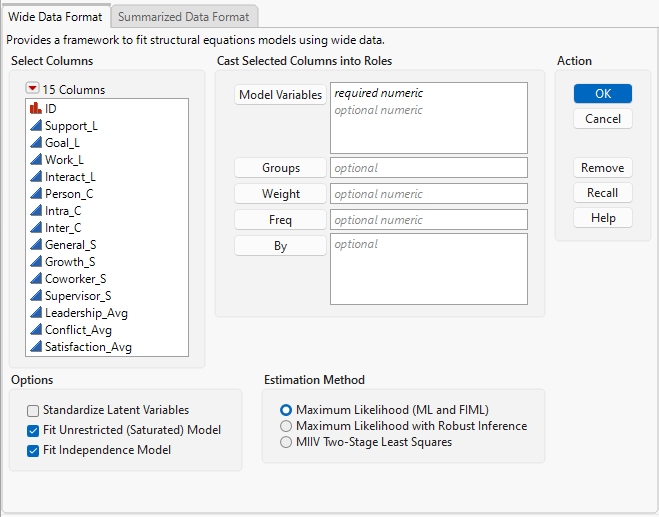
For more information about the options in the Select Columns red triangle menu, see “Column Filter Menu” in Using JMP.
The Launch Window includes tabs for two different data formats.
Wide Data Format
Select for data tables where each row corresponds to a single observation and the columns contain variables to be used in the model. Rows that contain only missing values are excluded from the analysis.
Summarized Data Format
Select for data tables where the data are summarized as a correlation or covariance matrix. Means and standard deviations can also be specified as columns. If they are not specified, the means are assumed to be zero and the standard deviations are assumed to be the square root of the diagonal of the input matrix.
 Launch Window Options
Model Variables
The columns that you want to include in the model. You must specify at least one column. All columns must have numeric data type and continuous modeling type.
For the Summarized Data Format, the Model Variables columns are the columns that contain the correlation or covariance matrix for the summarized data.
Groups
(Available only for Wide Data Format.) A column that specifies a grouping variable for multiple group analysis, which enables you to test equality constraints for effects across groups. This variable must be a categorical variable often with only a few levels.
Weight
(Available only for Wide Data Format.) A column whose numeric values assign a weight to each row in the analysis. Using weights activates robust inference, such that a sandwich correction is applied to the standard errors. Weights are adjusted to sum to the total sample size or to the group sample size in multiple group analysis.
Freq
(Available only for Wide Data Format.) A column whose numeric values assign a frequency to each row in the analysis.
By
(Available only for Wide Data Format.) A column that creates a report consisting of separate analyses for each level of the variable. If more than one By variable is assigned, a separate analysis is produced for each possible combination of the levels of the By variables.
Caution: Using a By variable does not fit a multiple group analysis model. To perform multiple group analysis, you must specify a Groups variable.
Mean
(Available only for Summarized Data Format.) A column of means that correspond to the variables in each row of the correlation or covariance matrix. If they are not specified, the means are assumed to be zero.
Std Dev
(Available only for Summarized Data Format.) A column of standard deviations that correspond to the variables in each row of the correlation or covariance matrix. If they are not specified, the standard deviations are assumed to be the square root of the diagonal of the input matrix.
Label
(Available only for Summarized Data Format.) A column of labels that correspond to the variables in each row of the correlation or covariance matrix. If they are not specified, the variables in the Model Specification report use the names of the columns that contain the input matrix.
Standardize Latent Variables
If selected, this option sets the scale of the latent variables by fixing their variance to one and allowing free estimation of all loadings.
Fit Unrestricted (Saturated) Model
If selected, the unrestricted model is automatically fit when you launch the platform. You can then compare your fitted model to the unrestricted model in the Model Comparison report. The unrestricted model is a fully saturated model, which fits all means, variances, and covariances of the specified Model Variables without imposing any structure on the data.
Fit Independence Model
If selected, the independence model is automatically fit when you fit your first model. You can then compare your fitted model to the independence model in the Model Comparison report. The independence model fits all means and variances of the specified Model Variables. All covariances among the specified Model Variables are fixed to zero, which leads to a highly restrictive model.
Sample Size
(Available only for Summarized Data Format.) Specifies the number of observations represented by the summarized data.
Estimation Method
Enables you to select from the following estimation methods for the model:
Maximum Likelihood (ML and FIML)
Fits a model that uses a Maximum Likelihood (ML) estimator when no data are missing, and a Full Information Maximum Likelihood (FIML) estimator when missing data are present. This option is selected by default.
Maximum Likelihood with Robust Inference
(Not available for Summarized Data Format.) Fits a model that uses Maximum Likelihood with Robust Inference. This method is useful when the outcome variable is not normally distributed but is assumed to follow an underlying continuous distribution. This estimator applies a sandwich correction to the standard errors and rescales the overall chi-square of the model. Also, the Maximum Likelihood with Robust Inference estimation method automatically enables the Robust Inference option in the Structural Equation Models red triangle menu, though you can deselect it after the model is launched if needed.
MIIV Two-Stage Least Squares
Fits a model using Model-Implied Instrumental Variables Two-Stage Least Squares (MIIV-2SLS) estimation. This noniterative estimator is robust to structural misspecification, does not require multivariate normality, and performs well with small samples or when maximum likelihood assumptions are not met. MIIV Two-Stage Least Squares also provides equation-level model fit tests (Sargan tests), which can help identify sources of misfit.