The Cell Plot
In JMP, the cell plot appears with a one-to-one correspondence of a colored cell that represents each data table entry. Colors are assigned to each cell based on the range and type of values that are found in the column.
Note: Any rows that are excluded in the data table are also hidden in the cell plot.
Figure 8.4 The Cell Plot
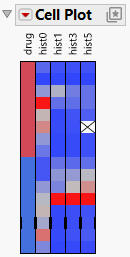
Note: To produce the plot that is shown in Figure 8.4, follow the instructions in Example of a Cell Plot.
Note the following information about cell plots:
• Nominal variables use a distinct color for each level. You can customize nominal and ordinal colors by using the Value Colors property of data columns, which is available through the Column Info option.
• Continuous variables are assigned a gradient of colors to show the smooth range of values in the variable.
• Ordinal variables are scaled like continuous variables in order.
• When some outliers are present, the scale uses all but the extreme categories for the 90% middle of the distribution so that the outliers do not overly influence the scale.
For more examples, see Additional Example of the Cell Plot Platform.