 Launch the Bayesian Optimization Platform
Launch the Bayesian Optimization platform by selecting Analyze > Specialized Modeling > Bayesian Optimization.
Figure 18.4 The Bayesian Optimization Launch Window
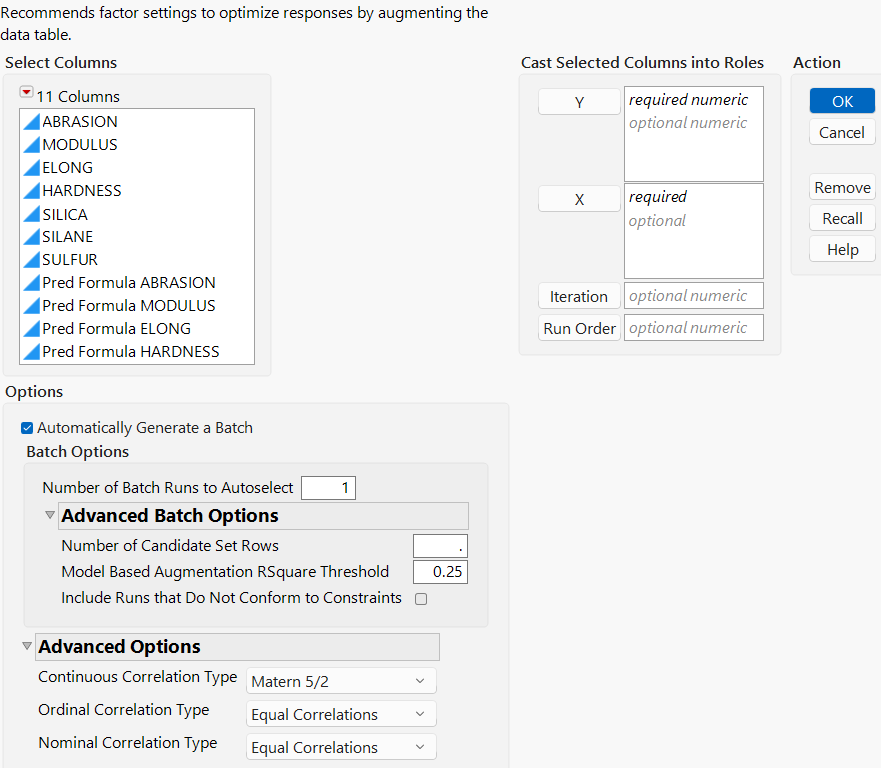
For more information about the options in the Select Columns red triangle menu, see “Column Filter Menu” in Using JMP.
The Bayesian Optimization launch window contains the following options:
Y
Specifies one or more continuous response columns. Response columns must include a Response Limits column property with lower and upper limits defined.
X
Specifies one or more factor columns.
Iteration
Specifies a column of iterations for the batches. This column is automatically created and updated by the platform. Use this column when returning to the platform to update the analysis after batch data collection. This column must have a Numeric data type, an Ordinal modeling type, and contain the values 0, 1,..., n. The Iteration column should also have a BO_Iteration_Col tag.
Note: The batch iteration column enumerates each time that you generate a new batch of runs and append the runs to your data table.
Run Order
Specifies a column that is used to order the points on the desirability chart. If this column is not specified, the row numbers are used instead.
Options
Automatically Generate a Batch
Automatically generates a candidate set and selects a batch based on the selections made in the Batch Options section. If this option is not selected, a candidate set is not generated and you can use the Batch Optimization Batch Customizer section of the report to generate your own candidate set. See Bayesian Optimization Batch Customizer.
Batch Options
The following batch options are available only if the Automatically Generate a Batch option is selected:
Number of Batch Runs to Autoselect
Specifies the number of runs (factor combinations) that are automatically selected as the next batch for data collection. When you click OK, the number of batch runs specified is the number of factor combinations in the Current Batch section of the Batch Selection tab. See Current Batch.
Advanced Batch Options
Shows a submenu of advanced options for specifying the batches.
Number of Candidate Set Rows
Specifies the number of factor combinations that are automatically generated to form the initial candidate set. The batch runs are selected from this candidate set. By default, the number of candidate set rows is the minimum of 1000 times the number of factors and 10,000.
Model Based Augmentation RSquare Threshold
Specifies a value that is used as a threshold to compare to the RSquare values of the models. The relationship between the model RSquare values and the specified threshold determine the default augmentation algorithm that is used to automatically select the batch runs. By default, this value is 0.25. The Bayesian Optimization platform uses the Space Filling Exploration, Confirm and Challenge Optima, and Refine Model algorithms to select batch runs. See Autoselect Rows.
Include Runs that Do Not Conform to Constraints
Specifies whether to include points that violate the linear constraints in the data table when generating or loading a candidate set.
Advanced Options
Shows a submenu of advanced options for Bayesian Optimization.
Continuous Correlation Type
Specifies the variance function that is used to model continuous response variables. You can select Gaussian, Matern 5/2, Matern 3/2, or Exponential variance functions.
Ordinal Correlation Type
Specifies the variance function that is used to model ordinal response variables. You can select Equal Correlations, Unequal Correlations, or Latent Variable.
Nominal Correlation Type
Specifies the variance function that is used to model nominal response variables. You can select Equal Correlations or Unequal Correlations.
 Data Format
It is required that response columns include the Response Limits column property prior to launching the platform. If you do not set response limits, an alert window is shown after you click OK in the launch window. You can click Add Goals in the alert window to add any missing response limits. The platform must then be relaunched. If using an Iteration column, this column must have a Numeric data type, an Ordinal modeling type, and contain the values 0, 1,..., n. The Iteration column should also have a BO_Iteration_Col tag. If an Iteration column is not specified in the launch window, it is created automatically after you save the first batch of runs.