About Column Filter Options
Figure 5.16 shows the options that are available when you click the More Column Filtering Options button ( ).
).
Figure 5.16 Example of a Column Filter Options Window
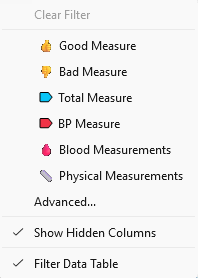
The Column Filtering Options window contains the following options:
Clear Filter
Enables you to remove the currently applied filter options. These options include tags and other column filter selections. This option is not available if one or more tags are not selected.
Tags
Enables you to choose which tags to apply when filtering the data table columns.
Advanced
Opens the Advanced Tag Filter window. See Advanced Tag Filter Window.
Show Hidden Columns
When selected, columns that are marked as hidden will be displayed in the Columns panel, but not the data grid.
Filter Data Table
When selected, the filter options are applied to the data grid.
Advanced Tag Filter Window
The Advanced Tag Filter window provides the following features:
• the ability to filter columns by Hide state, in addition to filtering by the column’s name and tags
• a footer that provides information about the filtered list
• a grid filter button that filters the data grid to match the Columns panel
Figure 5.17 Example of an Advanced Tag Filter Window

The Advanced Tag Filter window contains the following information:
Tags
Enables you to choose which tags to apply when filtering the data table columns.
Keep columns tagged with
Enables you to select one of the following options to display in the data grid:
ANY of the selected tags
By default, if no tag or only one tag is selected, this option is selected. If columns have any of the selected tags, they are displayed in the data grid.
ALL of the selected tags
This option is available if two or more tags are selected. If columns have all of the selected tags, they are displayed in the data grid.
Filter matches # columns
This information is available only if column matches exist. The information displays how many columns match the tag filter conditions.