Publication date: 07/15/2025
Set JMP Column Properties
The Column Info Window and the Columns Manager
Use the Column Info window and the Columns Manager to set specific properties on a column in a data table. Here are some examples of the actions that you can perform on a column:
• change data and modeling types
• change numeric formats
• add formulas
• specify restrictions on values or missing values
• order categorical values or row data
• save specification, control, or response limits
• add a tag
You can also standardize attributes and properties across multiple columns, assign a preselected analysis role to columns, and compress columns in a data table.
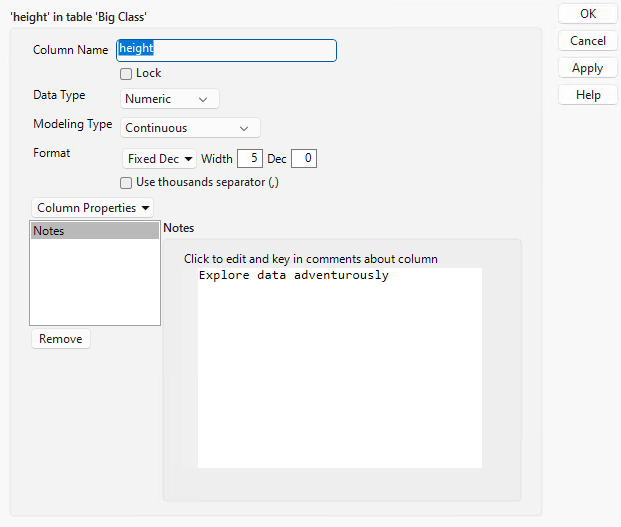
Figure 5.1 The Column Info Window
Contents
About the Column Info Window
About Modeling Types
Compact Character Columns
The Short-Integer Format
Numeric Formats
Store Information in Row State Columns
Initialize Data in a Column
About the Columns Manager
Filtering Columns
Add, Edit, and Delete Column Properties
Copy and Paste Column Properties and Attributes
Columns Manager Red Triangle Menu Options
Column Properties in JMP
Basic Column Properties
Column Tags
Properties That Validate Column Values
Properties That Attach Information to Column Values
Properties That Control the Display of Columns
Properties Used in Modeling and DOE
Properties Associated with Control Charts and Capability
Properties That Control How Columns Are Used in Platforms
SAS Properties
Link Data Tables with Virtual Join Properties
Additional Column Properties
Properties Assigned and Controlled by JMP
Column Tags
Create a New Tag
Add a Tag to a Column
Working with Tags
Column Filtering Options
About Column Filter Options
Examples of Column Filter Options
Standardize Attributes and Properties Across Columns
Recode Column Values
Standardize Column Attributes
Standardize Column Properties
Delete Column Properties
Example of Standardizing a Formula
Assign a Preselected Analysis Role to a Column
Want more information? Have questions? Get answers in the JMP User Community (community.jmp.com).