Confidence Interval for One Sample Mean
Use the Confidence Interval for One Sample Mean Explorer to determine a sample size for a confidence or prediction interval. Select DOE > Sample Size Explorers > Confidence Intervals > Confidence Interval for One Sample Mean. Explore the trade-offs between variability assumptions, sample size, significance, and the margin of error.
Interval Explorer for One Sample Mean Settings
Set study assumptions and explore sample sizes by using the radio buttons, text boxes, and menus. The profiler updates as you make changes to the settings. Alternatively, you can change the settings by dragging the cross hairs on the profiler curves.
Interval Type
Specifies the type of interval. Specify Bound for a one-sided interval (upper or lower bound). Specify Interval for a two-sided interval.
Confidence Level
Specifies the confidence level, 1 - alpha.
Interval Purpose
Specifies the purpose of the interval.
Confidence
Specifies a confidence interval for a mean.
Prediction
Specifies a prediction interval for one future observation.
Note: To size tolerance intervals, use the reliability tolerance interval explorers. See Parametric Tolerance Intervals and Example of the Parametric Tolerance Intervals Explorer.
Population Standard Deviation Assumption
Specifies the distribution for calculations.
Yes
Specifies a known standard deviation; calculations use the z distribution.
No
Specifies an unknown standard deviation; calculations use the t distribution.
Interval Explorer for One Sample Mean Profiler
The profiler enables you to visualize the impact of sample size assumptions on the margin of error calculations. Interactive profiler changes to the sample size or standard deviation update the calculated power. Interactive changes to the profiler power update the sample sizes. To solve for a specific variable, use the target variable setting and click Go.
Target Variable
Enables you to solve for the sample size or assumed standard deviation for a specified margin of error.
Margin of Error
Specifies the half-width of the interval. With all other parameters fixed, the margin of error decreases as the sample size increases.
Sample Size
Specifies the total number of observations (runs, experimental units, or samples) that are needed to construct your interval.
Std Dev
Specifies the assumed population standard deviation.
Interval Explorer for One Sample Mean Options
The Explorer red triangle menu and report buttons provide additional options:
Simulate Data
Opens a data table of simulated data that are based on the explorer settings. View the simulated response column formula for the settings that are used. Run the table script to analyze the simulated data.
Make Data Collection Table
Creates a new data table that you can use for data collection. The table includes scripts to facilitate data analysis.
Remember Settings
Saves the current settings to the Remembered Settings table. This enables you to save a set of alternative study plans. See Remembered Settings in the Sample Size Explorers.
Reset to Defaults
Resets all parameters and graphs to their default settings.
The Profiler red triangle menu contains the following option:
Optimization and Desirability
Enables you to optimize settings. See “Desirability Profiling and Optimization” in Profilers.
Note: The sample size explorer report can be saved as a *.jmpdoe file. Open the file to return to the explorer. An alert prompts you to save the file.
Example of the Confidence Interval for One Sample Mean Explorer
In this example, use the Confidence Interval for One Sample Mean Explorer to calculate the sample size that is needed to estimate a mean within 0.5 standard deviations with 95% confidence.
1. Select DOE > Sample Size Explorers > Confidence Intervals > Confidence Interval for One Sample Mean.
2. Leave Interval Type set to Interval for estimating a sample size for a two-sided confidence interval.
3. Leave Confidence Level set to 0.95.
4. Leave Interval Purpose set to Confidence.
5. Leave the population standard deviation assumption set to No.
The sample size is calculated using the t distribution.
6. Leave Target Variable set to Sample Size.
7. Set Margin of Error to 0.5.
8. In the profiler, set Std Dev to 1.
9. Click Go.
Figure 29.8 Confidence Interval Explorer for One Sample Mean
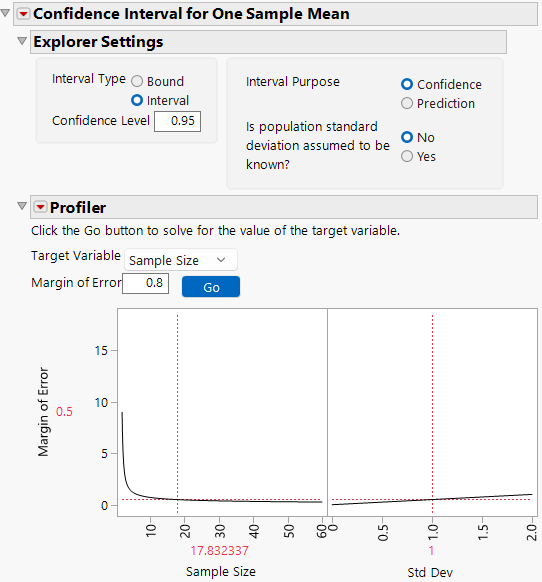
To estimate the mean within 0.5 standard deviation units requires 18 samples. The actual size of the confidence interval depends on the observed standard deviation. Calculating in standard deviation units is a way to estimate sample size without assuming a standard deviation.
Statistical Details for the Confidence Interval for One Sample Mean Explorer
The calculation for each interval type uses the standard normal-based procedures if σ is known and t distribution procedures or approximations otherwise.
Confidence Intervals
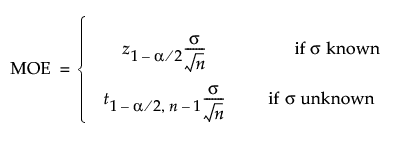
The margin of error (MOE) for a two-sided confidence interval is calculated as follows:
The MOE for a one-sided confidence interval is calculated as follows:
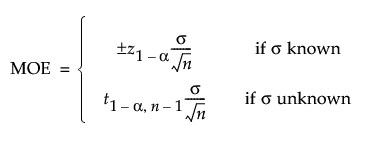
where:
α is the significance level
z1-α is the (1 - α)th quantile of the normal distribution
t1-α,ν is the (1 - α)th quantile of the central t-distribution with ν degrees of freedom
σ is the assumed population standard deviation
n is the number of samples.
Prediction Intervals
The MOE for prediction intervals is calculated as follows:
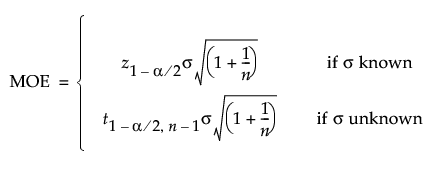
The bound is calculated as follows:
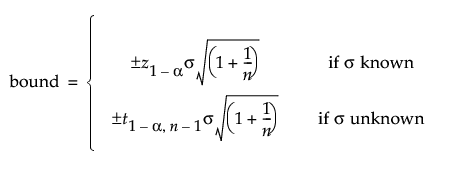
where:
α is the significance level
z1-α is the (1 - α)th quantile of the normal distribution
t1-α,ν is the (1 - α)th quantile of the central t-distribution with ν degrees of freedom
σ is the assumed population standard deviation
n is the number of samples.