Create Drill-Down Graphs from Hover Labels
A drill-down graph is created when you click on the thumbnail in a hover label. Clicking on the hover graph opens it in a new window, enabling you to see the graph in more detail and also make modifications such as changing the data filter. For example, click a cell on a treemap to see details about the data in a new window (Figure 12.48). Press Ctrl and click to replace the contents of the last launched window instead of opening a new window.
• The Next in Hierarchy column property enables you to define the behavior of categorical drill downs in preset graphs. This column property defines only one level of the drill down, from a category in a grouping role in the current visualization to the category in the grouping role in the next one, launched by the graphlet.
• If the Next in Hierarchy column property is not defined, the list of categorical or nominal columns from the data table that have not been added to a filter is used.
Notes:
• The Next in Hierarchy column property is not supported in graphlets defined using Paste Graphlet. See “Customize Graphs” in Using JMP for details about the Paste Graphlet command.
• If there is no measurement, JMP tries to get one from the data table and uses Count (or no measurement) if there are no numeric columns in the data table.
Figure 12.48 shows drilling-down on a cell in a treemap.
Figure 12.48 Example of a Drill-Down Graph on a Hover Label
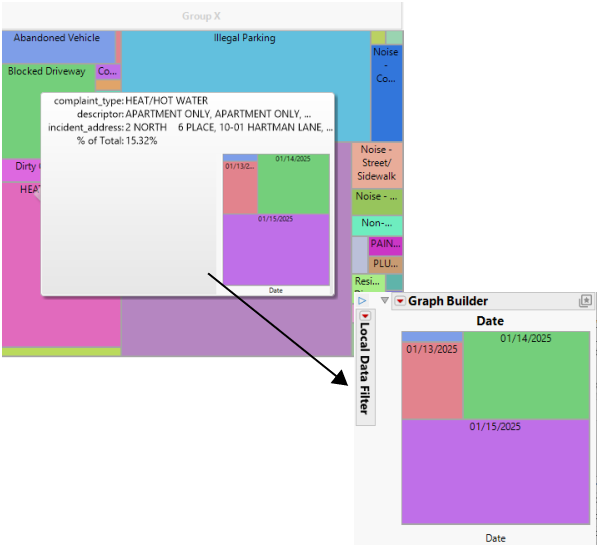
The following script creates the simplified versions of the treemap presets shown in Figure 12.48.
Names Default to Here(1);
dt = Open("$SAMPLE_DATA\NYC 311 Records.jmp");
Graph Builder(Variables( X( :complaint_type ) ),
Elements( Treemap( X, Legend( 3 ) ) ),
SendToReport(Dispatch( {}, "Graph Builder", FrameBox,
/* configure the graphlet -- a hover label extension that adds a visualization thumbnail to the hover label. Clicking on the thumbnail launches the associated visualization in its own window (or replaces the graph in the current window on a Ctrl-click). */
{Set Graphlet( Picture( Try(loader = If( Class Exists( "hllLoader" ),
New Object( "hllLoader" ),
Include( "$BUILTIN_SCRIPTS/hllib.jsl" )
);
loader:setDebug( 0 );
hlp = loader:lazyLoad( "hllPresets" );
hlp:launchTreemap();
,
Empty();)
),
Title( "Treemap Preset" ),
Reapply( 1 )
),
// add a pinned annotation to display the graphlet
Add Pin Annotation(Seg( TreeMapSeg( 1 ) ),
Index( 9 ),
Index Row( 185 ),
UniqueID( 9 ),
FoundPt( {409, 338} ),
Origin( {78.6519111570248, 180.013491048593} ),
RightOfCenter( 0 ),
Tag Line( 1 ),
Text Color( "Black" ),
Background Color( {230, 230, 230} )
)}
)
)
);