Multiple subscriptions
background-image

style
blue-purple-gradient, background-image-narrow, text-light, text-large
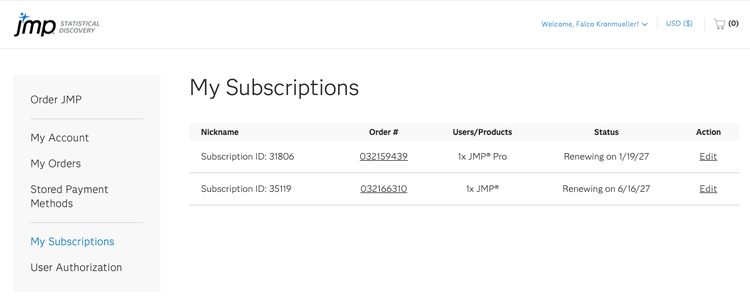
Customers can now have multiple subscriptions associated with the same account. Each subscription is managed independently and may have its own products, renewal date, quantity, and status.
Use the sections below to learn how to purchase additional subscriptions, add users to an existing subscription, and manage subscriptions in the JMP Store.
Purchase a new subscription
When to use
Purchase a new subscription when you want to create a separate subscription rather than add users to an existing one.
Examples:
- Purchasing a different JMP product.
- Creating a separate subscription for a different department or team.
- Maintaining separate renewal dates for different groups of users.
How to purchase a new subscription
Important notes
- New subscriptions are created independently from existing subscriptions.
- Each subscription has its own Subscription ID.
- Renewals and user management are handled separately for each subscription.
Add users to an existing subscription
When to use
Add users when you want to increase the number of licenses within an existing subscription rather than create a new subscription.
How to add users
Important notes
- Additional users are charged at a prorated price based on the time remaining in the current subscription term and will renew with the existing subscription.
- The subscription remains a single subscription with an updated quantity.
- A new Subscription ID is not created.
- Users can only be added to products associated with an existing subscription. To purchase a new product, start a new subscription.
View and manage your subscriptions
How to view and manage your subscriptions
Important notes
- Each subscription is managed independently.
- Changes made to one subscription do not affect other subscriptions on the account.
- User additions, product changes, renewal quotes, and renewal actions apply only to the selected subscription.
- Canceling a subscription affects only the selected subscription and does not impact any other active subscriptions on the account.
Frequently asked questions
- What's the difference between adding users and starting a new subscription?
Adding users increases the number of licenses within an existing subscription and retains the current renewal date. Starting a new subscription creates a separate subscription with its own Subscription ID, renewal settings, and renewal date. - How do I know which subscription to update?
Each subscription has a unique Subscription ID displayed on the My Subscriptions page. - Can I merge subscriptions?
No. Subscriptions are managed independently. - Can different subscriptions have different renewal dates?
Yes. Each subscription maintains its own renewal schedule.