 Restrict Factor Level Combinations
When you complete the Factors outline and click Continue, the Restrict Factor Level Combinations outline appears. This outline enables you to specify factor level combinations that are prohibited. Unless you have loaded a constraint or included one as part of a script, the None option is selected. To specify constraints, select one of the other options:
Defines sets of constraints based on restricting values of individual factors. You can define both AND and OR constraints. See Use Disallowed Combinations Filter.
Defines disallowed combinations and other constraints as Boolean JSL expressions in a script editor box. See Use Disallowed Combinations Script.
 Use Disallowed Combinations Filter
This option uses an adaptation of the Data Filter to facilitate specifying disallowed combinations. For detailed information about using the Data Filter, see Local Data Filter in the Using JMP book.
Note: The red triangle options in the Add Filter Factors menu are the same as those found in the Select Columns panel of many platform launch windows. See Column Filter Menu in the Using JMP book for additional details.
To remove a single factor, select Delete from its red triangle menu.
A factor can appear in several OR groups. An occurrence of the factor in a specific OR group is referred to as an instance of the factor.
|
–
|
Blocks Display shows each level as a block.
|
|
–
|
List Display shows each level as a member of a list.
|
|
–
|
Single Category Display shows each level.
|
|
–
|
Check Box Display adds a check box next to each value.
|
Provides a text box beneath the factor name where you can enter a search string for levels of the factor. Press the Enter key or click outside the text box to perform the search. Once Find is selected, the following Find options appear in the red triangle menu:
|
–
|
Clear Find clears the results of the Find operation and returns the panel to its original state.
|
|
–
|
Match Case uses the case of the search string to return the correct results.
|
|
–
|
Contains searches for values that include the search string.
|
|
–
|
Does not contain searches for values that do not include the search string.
|
|
–
|
Starts with searches for values that start with the search string.
|
|
–
|
Ends with searches for values that end with the search string.
|
 Use Disallowed Combinations Script
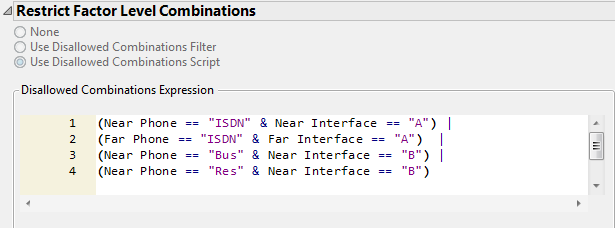
When creating the expression, use the name of the level in quotation marks. Do not use the ordinal value of the level. For example, Figure 19.19 shows the script that you entered in the phone interface example,Specify Disallowed Combinations Using a Script.
Figure 19.19 Script Window Showing Names of Levels in Quotes