Mixed Model Report and Options
The Mixed Model red triangle menu contains the following options:
Model Reports
Enables you to customize the reports that are shown for the mixed model fit. These reports give estimates and tests for model parameters, as well as fit statistics.
Fit Statistics
Shows or hides a report for model fit statistics. See Fit Statistics.
Random Effects Covariance Parameter Estimates
(Available only when there are random effects specified in the launch window.) Shows or hides a table of random effects covariance parameter estimates. See Random Effects Covariance Parameter Estimates.
Fixed Effects Parameter Estimates
Shows or hides a tabbed table of fixed effects parameter estimates. See Fixed Effects Parameter Estimates.
Repeated Effects Covariance Parameter Estimates
(Available only when there are repeated effects specified in the launch window.) Shows or hides a table of repeated effects covariance parameter estimates. See Repeated Effects Covariance Parameter Estimates.
Random Coefficients
(Available only when there are random effects specified in the launch window.) Shows or hides a report of the estimates for the random coefficients. See Random Coefficients.
Random Effects Predictions
(Available only when there are random effects specified in the launch window.) Shows or hides a table of random effect predictions. See Random Effects Predictions.
Fixed Effects Test
(Available only for models that contain at least one fixed effect.) Shows or hides the tests of fixed effects. See Fixed Effects Tests.
Empirical Standard Errors
Replaces the standard errors with sandwich estimates throughout the report. This option provides robust standard error estimates that can be used to account for possible model misspecification. To use sandwich estimates in a multiple comparisons, inverse prediction, or stability report, you must select this option prior to selecting the other report option.
Tip: Selecting the Empirical Standard Errors option automatically selects either the Between-Within Degrees of Freedom or the Containment Degrees of Freedom option. Non-Kenward-Roger degrees of freedom must be used with empirical standard errors.
Between-Within Degrees of Freedom
(Available only when the non-fixed effects in the model are all repeated effects.) Replaces the standard errors with unadjusted estimates and replaces the degrees of freedom to between-within based degrees of freedom throughout the report. To use between-within degrees of freedom in a multiple comparisons, inverse prediction, or stability report, you must select this option prior to selecting the other report option.
Containment Degrees of Freedom
(Not available when the non-fixed effects in the model are all repeated effects.) Replaces the standard errors with unadjusted estimates and replaces the degrees of freedom to containment-based degrees of freedom throughout the report. To use containment degrees of freedom in a multiple comparisons, inverse prediction, or stability report, you must select this option prior to selecting the other report option.
Sequential Tests
(Available only for models that contain at least one fixed effect.) Shows or hides the Sequential (Type 1) Tests report that contains the sums of squares as effects are added to the model sequentially. Conducts tests based on the sequential sums of squares. See Sequential Tests.
Multiple Comparisons
(Available only for models that contain at least one fixed effect.) Opens the Multiple Comparisons launch window that provides various methods for comparing least squares means of main effects and interaction effects. See Multiple Comparisons.
Once you click OK in the Multiple Comparisons launch window, a Multiple Comparisons report is added to the Mixed Model report window. A new Multiple Comparisons report is added each time you use the Multiple Comparisons option. Each Multiple Comparisons report contains estimates of the least squares means, standard error, and a 95% confidence interval. The report also contains estimates of the means, standard errors, and a confidence interval. You can change the α level in the Fit Model window by selecting Set Alpha Level from the Model Specification red triangle menu. This report is followed by the multiple comparisons test that you select. The All Pairwise Comparisons report provides equivalence tests.
Compare Slopes
(Available only when there is one nominal term, one continuous term, and their interaction effect for the fixed effects.) Shows or hides a report that enables you to compare the slopes of each level of the interaction effect in an analysis of covariance (ANCOVA) model. See Compare Slopes.
Inverse Prediction
(Available only when there is at least one continuous fixed effect term and there is a residual variance term.) Enables you to predict values of explanatory variables for one or more values of the response. See “Inverse Prediction”.
Stability Analysis
(Available only when there is a fixed time variable, a random blocking variable, and their interaction effect is included as a random effect.) Provides several techniques for shelf life estimation that use mixed model methodology. See Stability Analysis.
Linear Combination of Variance Components
(Available only when there are G-side effects.) Shows a report that enables you to compute confidence intervals for linear combinations of variance components. Initially, the report contains an editable text box and a table of variance components in the model. Use the text box to label the linear combination. Enter values in the cells in the right column of the table to specify the linear functions for your confidence intervals. After you specify a linear combination of parameters and click Done, a table appears that contains confidence intervals for the specified linear combination.
The table contains an estimate and standard error, as well as two types of confidence intervals (Satterthwaite and Wald) and a Wald p-value. The Wald p-value corresponds to a hypothesis test that the estimate differs from zero.
Tip: The Satterthwaite confidence interval is restricted to positive values, so it is not recommended for cases where the specified coefficients are negative. If the estimate is negative, the Satterthwaite confidence interval cannot be constructed and is reported as missing.
Homogeneity of Variance Test
(Available only for models that specify Unequal Variances as the Repeated Covariance Structure.) Shows or hides a report that contains a likelihood ratio test for the unequal variance model compared to the equal variance model. This option also produces a plot of the standard deviations across the levels of the repeated effect.
Marginal Model Inference
Shows or hides plots that are based on marginal predicted values and marginal residuals. These plots display the variation due to random effects. See Marginal Model Profilers.
Actual by Predicted Plot
Shows or hides a plot of actual values versus values that are predicted by the model, without accounting for the random effects. The Actual by Predicted Plot appears by default. See Actual by Predicted Plot.
Residual Plots
Shows or hides residual plots that assess model fit, without accounting for the random effects. See Residual Plots.
Profiler
Shows or hides a prediction profiler to examine the relationship between the response and the model terms, without accounting for random effects. For more information about the prediction profiler, see “Profiler” in Profilers.
Contour Profiler
Shows or hides a contour profiler to examine the relationship between the response and the model terms, without accounting for random effects. See “Contour Profiler” in Profilers.
Mixture Profiler
(Available only if the Mixture Effect attribute is applied to three or more factors in the model or the Mixture property is applied to three or more factor columns.) Shows or hides a mixture profiler to examine the relationship between the response and the model terms, without accounting for random effects. See “Mixture Profiler” in Profilers.
Surface Profiler
Shows or hides a surface profiler to examine the relationship between the response and the model terms, without accounting for random effects. See “Surface Plot” in Profilers.
Variogram
Shows or hides a variogram plot that shows the change in covariance as the distance between observations increases. When the Residual structure is selected, you can select the columns to use as temporal or spatial coordinates. See Variogram.
Conditional Model Inference
(Available only when there are random effects specified in the launch window.) Produces plots that are based on conditional predicted values and conditional residuals. These plots display the variation that remains, once random effects are accounted for. See Conditional Profilers.
Actual by Conditional Predicted Plot
Shows or hides a plot of actual values versus values that are predicted by the model, while accounting for the random effects. When there are random effects, the Actual by Conditional Predicted Plot appears by default. See Actual by Conditional Predicted Plot.
Conditional Residual Plots
Shows or hides residual plots that assess model fit, while accounting for the random effects. See Conditional Residual Plots.
Conditional Profiler
Shows or hides a prediction profiler to examine the relationship between the response and the model terms, while accounting for random effects. For more information about the prediction profiler, see “Profiler” in Profilers.
Conditional Contour Profiler
Shows or hides a contour profiler to examine the relationship between the response and the model terms, while accounting for random effects. See “Contour Profiler” in Profilers.
Conditional Mixture Profiler
(Available only if the Mixture Effect attribute is applied to three or more factors in the model or the Mixture property is applied to three or more factor columns.) Shows or hides a mixture profiler to examine the relationship between the response and the model terms, while accounting for random effects. See “Mixture Profiler” in Profilers.
Conditional Surface Profiler
Shows or hides a surface profiler to examine the relationship between the response and the model terms, while accounting for random effects. See “Surface Plot” in Profilers.
Covariance and Correlation Matrices
Contains options to view the covariance and correlation matrices that are associated with the model.
Covariance of Fixed Effects
Shows or hides the covariance matrix for the fixed effects in the model.
Covariance of Covariance Parameters
Shows or hides the covariance matrix for the random effects in the model. The effects in the matrix are ordered as follows: G-side random effects, R-side random effects, and residual effects.
Covariance of All Parameters
Shows or hides the covariance matrix for all effects in the model. The effects in the matrix are ordered as follows: fixed effects, G-side random effects, R-side random effects, and residual effects.
Correlation of Fixed Effects
Shows or hides the correlation matrix for the fixed effects in the model.
Repeated Measures Covariance Diagnostics
(Available only for models that specify an unstructured repeated covariance structure.) Shows or hides a report that contains diagnostic tools to help determine candidate covariance structures for the repeated measures analysis. The report contains the covariance matrix and correlation matrix of the repeated measures parameters. The report also contains a heat map of the correlations. The scale of the heat map is determined by the range of the correlations. If all the correlations are positive, the scale is 0 to 1; otherwise, the scale is -1 to 1.
Save Columns
Contains options to save various model results as one or more new columns in the data table.
Predictions
Saves a new column to the data table. The new column contains the marginal predicted values for the fitted model.
Prediction Formula
Saves a new formula column to the data table. The new column contains the prediction formula for the marginal mean. The column includes a Predicting column property that notes the source of the prediction. See Marginal Model Inference.
Prediction and Interval Formulas
Saves new formula columns to the data table. The columns contain formulas for the marginal mean predictions, confidence limits, and prediction limits. All columns are hidden by default except for the prediction formula column.
Tip: The limits columns that are created by this option contain properties that are used by the Prediction Profiler. Select this option if you want to use these limits in the profiler.
Standard Error of Predicted
Saves a new column to the data table. The new column contains the standard errors for the predicted marginal mean responses.
Mean Confidence Interval
Saves two new columns to the data table. The new columns contain the lower and upper 95% confidence limits for the mean response. These intervals include the variation in the estimation, but not in the response. You can change the α level in the Fit Model window by selecting Set Alpha Level from the Model Specification red triangle menu.
Indiv Confidence Interval
(Available for models that contain only G-side effects.) Saves two new columns to the data table. The new columns contain lower and upper 95% confidence limits for an individual response value. These intervals include the variation in both the response and its estimation. You can change the α level in the Fit Model window by selecting Set Alpha Level from the Model Specification red triangle menu.
Residuals
Saves a new column to the data table. The new column contains the observed response values minus their marginal mean predicted values. See Marginal Model Inference.
Conditional Predictions
Saves a new column to the data table. The new column contains the conditional mean predicted values.
Conditional Prediction Formula
Saves a new formula column to the data table. The new column contains the prediction formula for the conditional mean. The column includes a Predicting column property that notes the source of the prediction. See Conditional Profilers.
Standard Error of Conditional Predicted
Saves a new column to the data table. The new column contains the standard errors for the predicted conditional mean responses.
Conditional Mean CI
(Available for models that contain a G-side effect.) Saves two new columns to the data table. The new columns contain the lower and upper 95% confidence limits for the expected value from conditional prediction. The confidence intervals include random effect estimates for models with random effects. See Conditional Model Inference. You can change the α level in the Fit Model window by selecting Set Alpha Level from the Model Specification red triangle menu.
Conditional Residuals
Saves a new column to the data table. The new column contains the observed response values minus their conditional mean predicted values. See Conditional Model Inference.
Save Simulation Formula
(Available only for variance component and random coefficient models. Not available when a By variable is specified in the Fit Model launch window.) Saves a new formula column to the data table. The new column contains a formula that generates simulated values using the estimated parameters for the model that you fit. This column can be used in the Simulate utility as a Column to Switch In. See “Simulate” in Basic Analysis.
Model Dialog
Shows the completed Fit Model launch window for the current analysis. See Fit Model Launch Window.
See “Local Data Filters in JMP Reports”, “Redo Menus in JMP Reports”, “Group Platform”, and “Save Script Menus in JMP Reports” in Using JMP for more information about the following options:
Local Data Filter
Shows or hides the local data filter that enables you to filter the data used in a specific report.
Redo
Contains options that enable you to repeat or relaunch the analysis. In platforms that support the feature, the Automatic Recalc option immediately reflects the changes that you make to the data table in the corresponding report window.
Platform Preferences
Contains options that enable you to view the current platform preferences or update the platform preferences to match the settings in the current JMP report.
Save Script
Contains options that enable you to save a script that reproduces the report to several destinations.
Note: Additional options for this platform are available through scripting. Open the Scripting Index under the Help menu. In the Scripting Index, you can also find examples for scripting the options that are described in this section.
 Fit Statistics
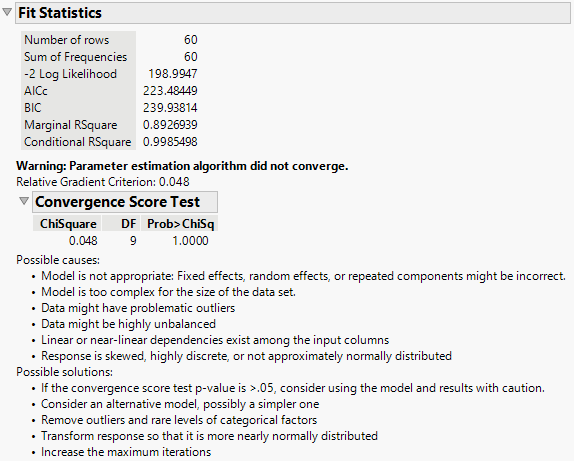
The Fit Statistics report in the Mixed Model personality provides statistics used for model comparison. For all fit statistics, smaller is better. A likelihood ratio test between two models can be performed if one model is contained within the other. If not, a cautious comparison of likelihoods can be informative. For an example, see Fit a Spatial Structure Model.
Description of the Fit Statistics Report uses the following notation:
• Specify the mixed model:
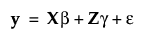
Here y is the nx1 vector of observations, β is a vector of fixed-effect parameters, γ is a vector of random-effect parameters, and ε is a vector of errors.
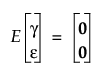
• The vectors γ and ε are assumed to have a multivariate normal distribution where
and
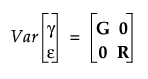
• With these assumptions, the variance of y is calculated as follows:
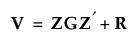
Description of the Fit Statistics Report
Number of Rows
The number of rows in the data table.
Sum of Frequencies
The sum of the values of a column assigned to the Freq or Weight role in the Fit Model window.
-2 Residual Log Likelihood
The final evaluation of twice the negative residual log-likelihood, the objective function.

where
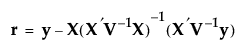
and p is the rank of X. Use the residual likelihood only for model comparisons where the fixed effects portion of the model is identical. See “Likelihood, AICc, and BIC”.
-2 Log Likelihood
The evaluation of twice the negative log-likelihood function. See “Likelihood, AICc, and BIC”.
Use the log-likelihood for model comparisons in which the fixed, random, and repeated effects differ in any of the models.
AICc
Corrected Akaike’s Information Criterion. See “Likelihood, AICc, and BIC”.
BIC
Bayesian Information Criterion. See “Likelihood, AICc, and BIC”.
RSquare
(Appears for models that contain only fixed effects.) The R-square value based on the marginal prediction.
Marginal RSquare
(Appears when there are G-side effects.) The R-square value based on the marginal prediction.
Conditional RSquare
(Appears when there are G-side effects.) The R-square value based on the full conditional prediction that includes the random effects.
 Convergence Score Test
If there are problems with model convergence, a warning message is displayed below the fit statistics. Figure 8.11 shows the warning that suggests the cause and possible solutions to the convergence issue. It also includes a test of the relative gradient at the final iteration. If this test is not significant, the model might be correct but not fully reaching the convergence criteria. In this case, consider using the model and results with caution. See Statistical Details for the Convergence Score Test.
Figure 8.11 Convergence Score Test