 Launch the Causal Treatment Personality
Launch the Causal Treatment personality by selecting Analyze > Fit Model, entering one column for Y, selecting Causal Treatment from the Personality menu, and entering one column for Treatment.
For more information about aspects of the Fit Model window that are common to all personalities, see “Model Specification”. For more information about the options in the Select Columns red triangle menu, see “Column Filter Menu” in Using JMP. Information that is specific to the Causal Treatment personality is presented here.
 Response Model Tab
Use the Response Model tab to add variables to model the outcome. Use the Add, Cross, Nest, and Macros options as needed. The Transform options enable you to apply functions to the chosen variables. For more information about these options, see “Construct Model Effects Tabs”.
Binary Treatment
When the treatment is binary, two response models are fit by using generalized linear mixed models (GLMM): one model for each level of the treatment, with the chosen variables as fixed effects. For more information about this method, see “Generalized Linear Mixed Models”.
Figure 14.6 Fit Model Launch Window That Shows Response Model Tab
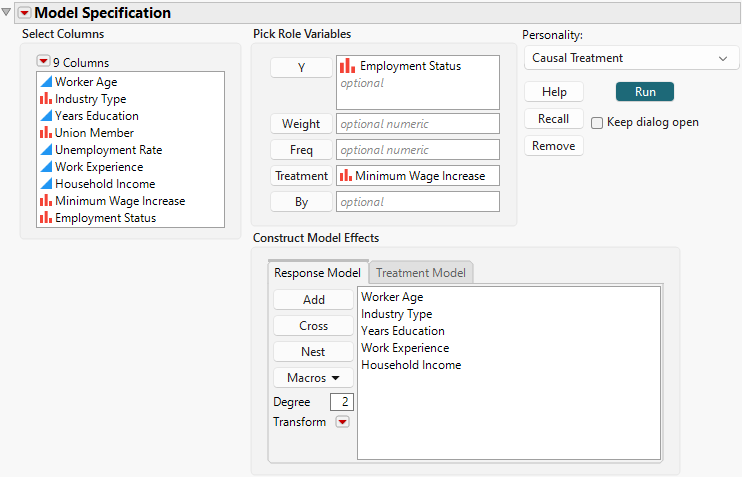
The response is modeled by using logistic regression with a logit link when the outcome (Y) is binary and by using linear regression when the outcome is continuous. If no variables are specified for the response model, only the treatment model is used to estimate causal effects.
Continuous Treatment
When the treatment is continuous, any variables that are selected for the response model are ignored. For information about how the response models are automatically fit, see Statistical Details for Continuous Treatment Methods.
 Treatment Model Tab
Use the Treatment Model tab to add variables to model the treatment. Use the Add, Cross, Nest, and Macros options as needed. The Transform options enable you to apply functions to the chosen variables. For more information about these options, see “Construct Model Effects Tabs”.
Binary Treatment
When the treatment is binary, the treatment model is fit by using generalized linear mixed models (GLMM), and the chosen variables are included as fixed effects. Specifically, the treatment variable is modeled by using logistic regression with a logit link. If no variables are specified for the treatment model, only the response model is used to estimate causal effects.
Figure 14.7 Fit Model Launch Window That Shows Treatment Model Tab

Continuous Treatment
When the treatment is continuous, it is necessary to specify the treatment model. The treatment model is fit by using GLMM, and the chosen variables are included as fixed effects. Specifically, the treatment variable is modeled by using linear regression.